<?xml version="1.0" encoding="utf-8"?>
<feed xmlns="http://www.w3.org/2005/Atom">
  <title>banban&#39;s Blog</title>
  <icon>https://www.gravatar.com/avatar/0571ff454db1ab343c858f10a02ffebe</icon>
  <subtitle>Learn Anything, Anytime, Anywhere~</subtitle>
  <link href="/atom.xml" rel="self"/>
  
  <link href="https://banbanpeppa.github.io/"/>
  <updated>2022-05-05T09:46:51.774Z</updated>
  <id>https://banbanpeppa.github.io/</id>
  
  <author>
    <name>Chen Zhi Ling</name>
    <email>wisteriasomnus@gmail.com</email>
  </author>
  
  <generator uri="http://hexo.io/">Hexo</generator>
  
  <entry>
    <title>Linux 服务性能分析与火焰图🔥</title>
    <link href="https://banbanpeppa.github.io/2022/05/05/golang/prof/"/>
    <id>https://banbanpeppa.github.io/2022/05/05/golang/prof/</id>
    <published>2022-05-05T08:59:57.762Z</published>
    <updated>2022-05-05T09:46:51.774Z</updated>
    
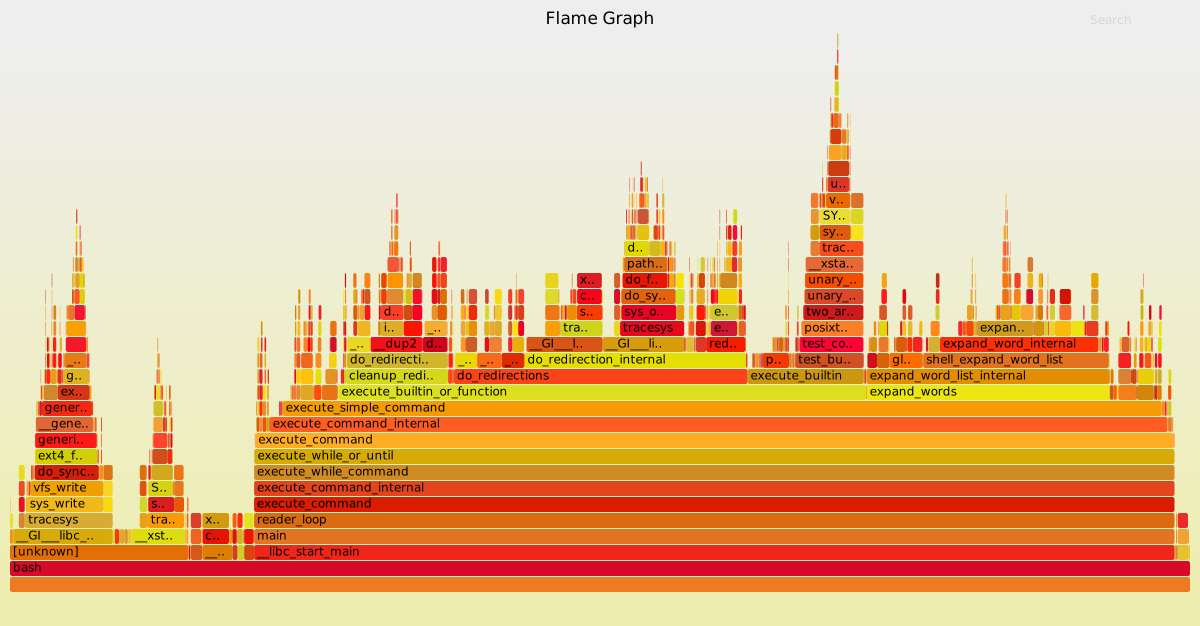
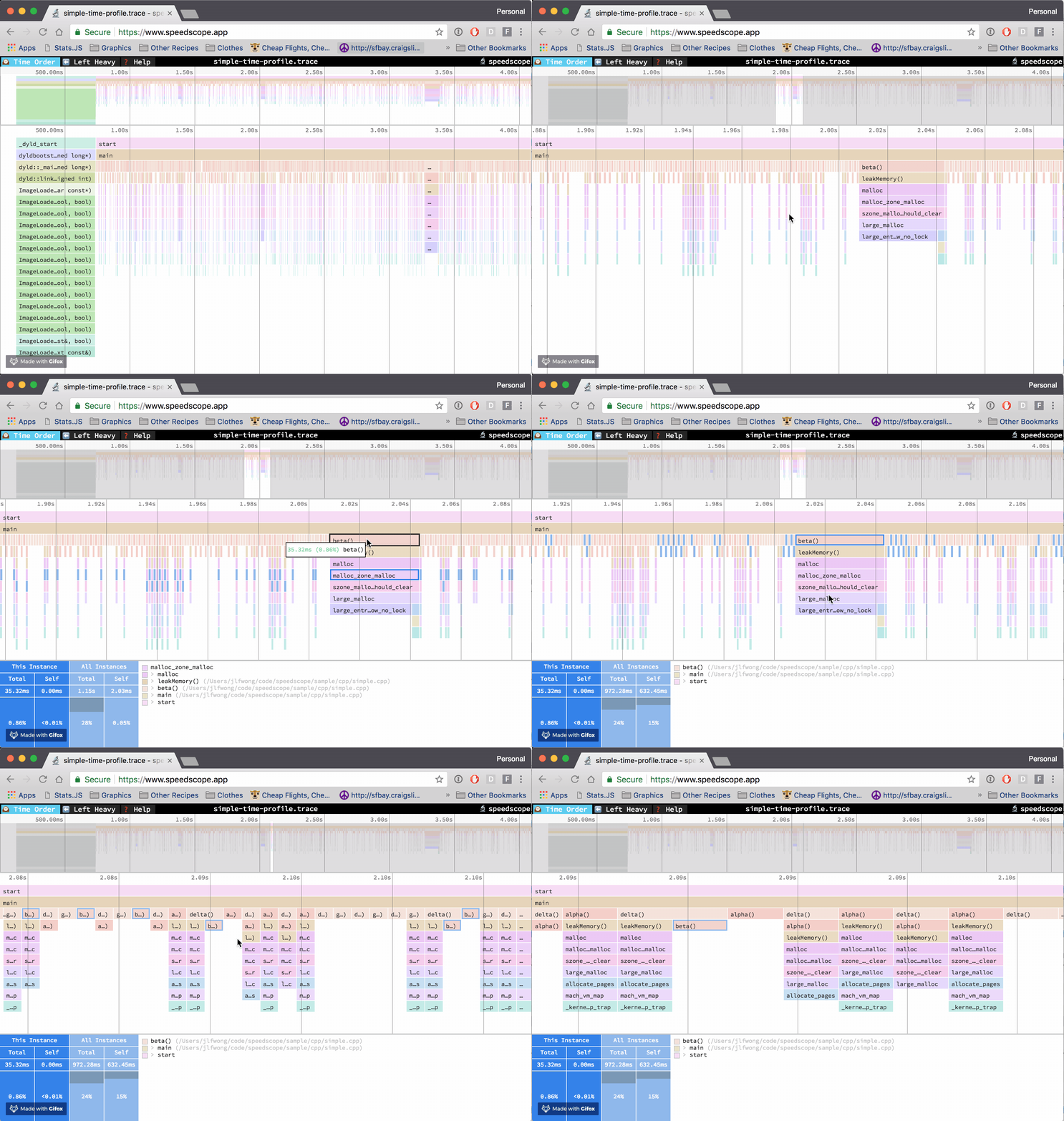
    <content type="html"><![CDATA[<p>运行在生产环境中的服务遇到资源消耗大，吃 CPU、内存的情况，便需要分析具体是哪一块代码执行出了问题。Linux 提供了许多性能分析工具，这边主要尝试使用 perf_events.</p><p>Perf_events简称perf是 Linux 系统原生提供的性能分析工具，会返回 CPU 正在执行的函数名以及调用栈（stack）。通常，它的执行频率是 99Hz（每秒99次），如果99次都返回同一个函数名，那就说明 CPU 这一秒钟都在执行同一个函数，可能存在性能问题。</p><h3 id="工具安装"><a href="#工具安装" class="headerlink" title="工具安装"></a>工具安装</h3><h4 id="安装-perf"><a href="#安装-perf" class="headerlink" title="安装 perf"></a>安装 perf</h4><p>perf 在 Linux 的工具包中，安装</p><pre><code class="bash">apt install linux-tools</code></pre><p>由于 perf 的分析往往会结合火焰图，需要补充安装 perf_data_converter ，这个能够将 perf 生成的文件进行转化，转为火焰图工具能够识别的格式，具体可参考：<a href="https://github.com/google/perf_data_converter，这边以" target="_blank" rel="noopener">https://github.com/google/perf_data_converter，这边以</a> Debian 为例</p><h4 id="安装bazel"><a href="#安装bazel" class="headerlink" title="安装bazel"></a>安装bazel</h4><p>方法1：源安装 bazel</p><pre><code class="bash">apt install apt-transport-https curl gnupgcurl -fsSL https://bazel.build/bazel-release.pub.gpg | gpg --dearmor &gt; bazel.gpgsudo mv bazel.gpg /etc/apt/trusted.gpg.d/echo &quot;deb [arch=amd64] https://storage.googleapis.com/bazel-apt stable jdk1.8&quot; | sudo tee /etc/apt/sources.list.d/bazel.listsudo apt update &amp;&amp; sudo apt install bazelbazel --version</code></pre><p>方法2：二进制包安装 bazel</p><pre><code class="bash">wget https://github.com/bazelbuild/bazel/releases/download/5.1.1/bazel-5.1.1-linux-x86_64chmod +x bazel-&lt;version&gt;-installer-linux-x86_64.sh./bazel-&lt;version&gt;-installer-linux-x86_64.sh --user</code></pre><h4 id="安装perf-data-converter"><a href="#安装perf-data-converter" class="headerlink" title="安装perf_data_converter"></a>安装perf_data_converter</h4><pre><code class="bash">git clone https://github.com/google/perf_data_converter.gitcd perf_data_converterbazel build src:perf_to_profile</code></pre><p>编译完之后将 perf_to_profile 文件移动到 <code>/usr/local/bin</code> 目录下</p><h4 id="下载-speedscope-工具并部署"><a href="#下载-speedscope-工具并部署" class="headerlink" title="下载 speedscope 工具并部署"></a>下载 speedscope 工具并部署</h4><p>项目地址： <a href="https://github.com/jlfwong/speedscope" target="_blank" rel="noopener">https://github.com/jlfwong/speedscope</a></p><p>服务部署可以通过 nginx 代理的方式，采用 docker-compose 完成</p><p>docker-compose.yaml</p><pre><code class="yaml">version: &#39;3.1&#39;services:  custom-nginx-proxy:    image: nginx:1.10.1    volumes:      - ${STATIC_FILE_PATH}:/usr/share/nginx/html:ro      - ${NGINX_CONFIG_PATH}:/etc/nginx/conf.d/default.conf:ro    ports:      - ${PROXY_PORT:-8080}:80networks:  default:    driver: bridge    driver_opts:      com.docker.network.driver.mtu: 1400</code></pre><p>.env</p><pre><code>STATIC_FILE_PATH=/home/nginx/file_storeNGINX_CONFIG_PATH=/home/nginx/default.confPROXY_PORT=80</code></pre><p>default.conf</p><pre><code>server {    listen       80;    server_name  localhost;    #charset koi8-r;    #access_log  /var/log/nginx/log/host.access.log  main;    location / {        root   /usr/share/nginx/html;        index  index.html index.htm;        autoindex on;        autoindex_exact_size on;        autoindex_localtime on;        charset utf-8;    }    #error_page  404              /404.html;}</code></pre><p>将 speedscope 的资源文件下载到目录 <code>/home/nginx/file_store</code> 目录下</p><pre><code>cd /home/nginx/file_storewget https://github.com/jlfwong/speedscope/releases/download/v1.13.0/speedscope-1.13.0.zipunzip speedscope-1.13.0.zip</code></pre><p>接来下就可以通过部署服务的机器访问：<a href="http://localhost/speedscope" target="_blank" rel="noopener">http://localhost/speedscope</a></p><h4 id="下载-FlameGraph"><a href="#下载-FlameGraph" class="headerlink" title="下载 FlameGraph"></a>下载 FlameGraph</h4><p>项目地址：<a href="https://github.com/brendangregg/FlameGraph" target="_blank" rel="noopener">https://github.com/brendangregg/FlameGraph</a></p><p>直接下载即可：<a href="https://github.com/brendangregg/FlameGraph/releases" target="_blank" rel="noopener">https://github.com/brendangregg/FlameGraph/releases</a></p><h3 id="定位问题"><a href="#定位问题" class="headerlink" title="定位问题"></a>定位问题</h3><p>工具已就绪，直接按照需要执行下面的命令</p><p>例如要排查一个服务进程的资源使用情况，假定进程名称为：go-proxy</p><p>则先获取进程的 ID</p><pre><code>TARGET_PID=$(ps -ef | grep go-proxy | grep -v grep | awk -F &#39; &#39; &#39;{print $2}&#39;)</code></pre><p>使用 perf 获取对应的性能指标记录</p><pre><code>perf record -F 99 -p ${TARGET_PID} -g -- sleep 60</code></pre><p>上面的命令中，perf record 表示记录，-F 99表示每秒 99 次，-p xxx 是进程号，即对哪个进程进行分析，也可以对线程进行分析，-g表示记录调用栈，sleep 60 则是持续 60 秒。运行后会产生一个庞大的文本文件 <code>perf.data</code></p><p>为了能够利用火焰图进行观察，需要进行下列两个步骤获得符合火焰图格式的 profile 文件</p><pre><code class="bash">perf script -i perf.data &amp;&gt; perf.unfold</code></pre><pre><code class="bash">FlameGraph-1.0/stackcollapse-perf.pl perf.unfold &amp;&gt; perf.folded</code></pre><p>利用上面下载的 FlameGraph 工具导出火焰图</p><pre><code>FlameGraph-1.0/flamegraph.pl perf.folded &gt; perf.svg</code></pre><p>例如：</p><p><img src="http://www.brendangregg.com/FlameGraphs/cpu-bash-flamegraph.svg" alt="img"></p><p>同时也可以将 <code>perf.folded</code> 文件放到 speedscope 中分析</p><ol><li>将 <code>perf.folded</code> 文件放置于 <code>/home/nginx/file_store</code> 目录下</li><li>通过链接 <a href="http://localhost/speedscope/#profileURL=http%3A%2F%2Flocalhost%2Fperf.folded&amp;title=go_proxy" target="_blank" rel="noopener">http://localhost/speedscope/#profileURL=http%3A%2F%2Flocalhost%2Fperf.folded&amp;title=go_proxy</a> 访问即可</li></ol><p>上面的格式只要遵循：<code>#profileURL=[URL-encoded profile URL]&amp;title=[URL-encoded custom title]</code>即可，不过要注意 profileUrl 需要是可跨域的，这边示例是放在同一个域名下，不会有跨域问题</p><p><img src="https://user-images.githubusercontent.com/150329/40900669-86eced80-6781-11e8-92c1-dc667b651e72.gif" alt="img"></p><h3 id="分析"><a href="#分析" class="headerlink" title="分析"></a>分析</h3><p>火焰图最直观的就是每隔一个方法调用在整个 CPU 采样中的占比，移动鼠标到对应的方法栈上面能够显示 CPU 使用的占比，进而分析哪一个方法的资源耗费最大。</p>]]></content>
    
    <summary type="html">


        &lt;p&gt;运行在生产环境中的服务遇到资源消耗大，吃 CPU、内存的情况，便需要分析具体是哪一块代码执行出了问题。Linux 提供了许多性能分析工具，这边主要尝试使用 perf_events.&lt;/p&gt;
&lt;p&gt;Perf_events简称perf是 Linux 系统原生提供的性能分析工具，
      
    
    </summary>
    
    
      <category term="Linux" scheme="https://banbanpeppa.github.io/tags/Linux/"/>
    
      <category term="Golang" scheme="https://banbanpeppa.github.io/tags/Golang/"/>
    
  </entry>
  
  <entry>
    <title>Redis 笔记</title>
    <link href="https://banbanpeppa.github.io/2022/04/12/bigdata/redis/redis/"/>
    <id>https://banbanpeppa.github.io/2022/04/12/bigdata/redis/redis/</id>
    <published>2022-04-12T03:00:37.169Z</published>
    <updated>2022-05-05T09:00:06.443Z</updated>
    
    <content type="html"><![CDATA[<h2 id="最佳实践"><a href="#最佳实践" class="headerlink" title="最佳实践"></a>最佳实践</h2><h3 id="查出什么拖慢了-Redis"><a href="#查出什么拖慢了-Redis" class="headerlink" title="查出什么拖慢了 Redis"></a>查出什么拖慢了 Redis</h3><pre><code class="bash">127.0.0.1:6379&gt; INFO commandstats# Commandstatscmdstat_get:calls=78,usec=608,usec_per_call=7.79cmdstat_setex:calls=5,usec=71,usec_per_call=14.20cmdstat_keys:calls=2,usec=42,usec_per_call=21.00cmdstat_info:calls=10,usec=1931,usec_per_call=193.10</code></pre>]]></content>
    
    <summary type="html">


        &lt;h2 id=&quot;最佳实践&quot;&gt;&lt;a href=&quot;#最佳实践&quot; class=&quot;headerlink&quot; title=&quot;最佳实践&quot;&gt;&lt;/a&gt;最佳实践&lt;/h2&gt;&lt;h3 id=&quot;查出什么拖慢了-Redis&quot;&gt;&lt;a href=&quot;#查出什么拖慢了-Redis&quot; class=&quot;headerlink
      
    
    </summary>
    
    
      <category term="Big Data" scheme="https://banbanpeppa.github.io/tags/Big-Data/"/>
    
      <category term="Redis" scheme="https://banbanpeppa.github.io/tags/Redis/"/>
    
  </entry>
  
  <entry>
    <title>MongoDB 笔记</title>
    <link href="https://banbanpeppa.github.io/2022/04/11/bigdata/mongodb/mongodb/"/>
    <id>https://banbanpeppa.github.io/2022/04/11/bigdata/mongodb/mongodb/</id>
    <published>2022-04-11T10:20:06.903Z</published>
    <updated>2022-05-05T08:59:16.961Z</updated>
    
    <content type="html"><![CDATA[<h2 id="最佳实践"><a href="#最佳实践" class="headerlink" title="最佳实践"></a>最佳实践</h2><p>传送门：<a href="https://pepa.holla.cz/wp-content/uploads/2016/07/50-Tips-and-Tricks-for-MongoDB-Developers.pdf" target="_blank" rel="noopener">《50 Tips and Tricks for MongoDB Developers》</a></p><h3 id="速度优先使用嵌入数据，完整性优先使用引用数据"><a href="#速度优先使用嵌入数据，完整性优先使用引用数据" class="headerlink" title="速度优先使用嵌入数据，完整性优先使用引用数据"></a>速度优先使用嵌入数据，完整性优先使用引用数据</h3><p><strong>规范化架构</strong></p><pre><code class="json">{     &quot;_id&quot; : productId,     &quot;name&quot; : name,     &quot;price&quot; : price,     &quot;desc&quot; : description}{    &quot;_id&quot; : orderId,    &quot;user&quot; : userInfo,    &quot;items&quot; : [        productId1,        productId2,        productId3    ]}</code></pre><p><strong>非规范化架构</strong></p><pre><code class="json">{  &quot;_id&quot; : productId,  &quot;name&quot; : name,  &quot;price&quot; : price,  &quot;desc&quot; : description}{​    &quot;_id&quot; : orderId,​    &quot;user&quot; : userInfo,​    &quot;items&quot; : [​        {​            &quot;_id&quot; : productId1,​            &quot;name&quot; : name1,​            &quot;price&quot; : price1​        },​        {​            &quot;_id&quot; : productId2,​            &quot;name&quot; : name2,​            &quot;price&quot; : price2​        },​        {​            &quot;_id&quot; : productId3,​            &quot;name&quot; : name3,​            &quot;price&quot; : price3​        }​    ]}</code></pre><h3 id="合理建立索引"><a href="#合理建立索引" class="headerlink" title="合理建立索引"></a>合理建立索引</h3><p>数据示例</p><pre><code class="json">{    &quot;_id&quot;: ObjectId(&#39;xxx&#39;),    &quot;threadId&quot;: 123,    &quot;data&quot;: ISODate(&quot;2022-04-13&quot;)}</code></pre><p>查询语句</p><pre><code class="bash">db.posts.find({&quot;threadId&quot; : id}).sort({&quot;date&quot; : 1}).limit(20)</code></pre><p>业务经常需要这种数据分页式查询，则可以建立索引</p><pre><code class="bash">db.posts.createIndex({&#39;threadId&#39; : 1, &#39;date&#39; : 1}, {&#39;background&#39;: true})</code></pre><h3 id="尽可能预填充已知内容"><a href="#尽可能预填充已知内容" class="headerlink" title="尽可能预填充已知内容"></a>尽可能预填充已知内容</h3><p>例如某一条记录是用于记录一天内固定的6个小时的访问情况</p><pre><code class="json">{​    &quot;_id&quot; : pageId,​    &quot;start&quot; : time,​    &quot;visits&quot; : {​        &quot;minutes&quot; : [​            [num0, num1, ..., num59],​            [num0, num1, ..., num59],​            [num0, num1, ..., num59],​            [num0, num1, ..., num59],​            [num0, num1, ..., num59],​            [num0, num1, ..., num59]​        ],​        &quot;hours&quot; : [num0, ..., num5] ​    }}</code></pre><p>则对于那些仍未发生的内容，可以用缺省值先填充</p><pre><code class="json">{​    &quot;_id&quot; : pageId,​    &quot;start&quot; : someTime,​    &quot;visits&quot; : {​        &quot;minutes&quot; : [​            [0, 0, ..., 0],​            [0, 0, ..., 0],​            [0, 0, ..., 0],​            [0, 0, ..., 0],​            [0, 0, ..., 0],​            [0, 0, ..., 0]​        ],​        &quot;hours&quot; : [0, 0, 0, 0, 0, 0]​    }}</code></pre><p>MongoDB不需要为新内容寻找空间，它只是更新已经输入的值，这样会快很多。</p><p>例如，在小时开始时，程序可能会执行以下操作：</p><pre><code class="bash">&gt; db.pages.update({&quot;_id&quot; : pageId, &quot;start&quot; : thisHour}, ... {&quot;$inc&quot; : {&quot;visits.0.0&quot; : 3}})</code></pre><h3 id="尽可能预聚合"><a href="#尽可能预聚合" class="headerlink" title="尽可能预聚合"></a>尽可能预聚合</h3><p>例：提前把 total 值算好，MongoDB 是很笨重的数据库，对简单的检索效率很高，但是在数据量大的情况下做很复杂的聚合，性能会随着复杂度提升而降低。</p><pre><code class="bash">&gt; db.food.update(criteria, {&quot;$inc&quot; : {&quot;apples&quot; : 10, &quot;oranges&quot; : -2, &quot;total&quot; : 8}})&gt; db.food.findOne(){    &quot;_id&quot; : 123,    &quot;apples&quot; : 20,    &quot;oranges&quot; : 3,    &quot;total&quot; : 23}</code></pre><p>MongoDB提供了以下Read Preference Mode：</p><ul><li><strong><em>primary</em></strong>：默认模式，一切读操作都路由到replica set的primary节点</li><li><strong><em>primaryPreferred</em></strong>：正常情况下都是路由到primary节点，只有当primary节点不可用（failover）的时候，才路由到secondary节点。</li><li><strong><em>secondary</em></strong>：一切读操作都路由到replica set的secondary节点</li><li><strong><em>secondaryPreferred</em></strong>：正常情况下都是路由到secondary节点，只有当secondary节点不可用的时候，才路由到primary节点。</li><li><strong><em>nearest</em></strong>：从延时最小的节点读取数据，不管是primary还是secondary。对于分布式应用且MongoDB是多数据中心部署，nearest能保证最好的data locality。</li></ul><h2 id="踩坑记录"><a href="#踩坑记录" class="headerlink" title="踩坑记录"></a>踩坑记录</h2><h3 id="配置足够多的-Mongos-实例"><a href="#配置足够多的-Mongos-实例" class="headerlink" title="配置足够多的 Mongos 实例"></a>配置足够多的 Mongos 实例</h3><p>在一些业务下，会频繁请求后端并读取 Mongo 数据。对于这种业务切忌增加耗时的操作</p><pre><code class="python">def get_method():    # 这边通过 Mongo 获取数据    data = self.mongo_service.get()    # 这边有一个耗时的数据处理，例如从别的系统获取数据    self.combine_data_from_http(data)    return data</code></pre>]]></content>
    
    <summary type="html">


        &lt;h2 id=&quot;最佳实践&quot;&gt;&lt;a href=&quot;#最佳实践&quot; class=&quot;headerlink&quot; title=&quot;最佳实践&quot;&gt;&lt;/a&gt;最佳实践&lt;/h2&gt;&lt;p&gt;传送门：&lt;a href=&quot;https://pepa.holla.cz/wp-content/uploads/2016/07/
      
    
    </summary>
    
    
      <category term="Big Data" scheme="https://banbanpeppa.github.io/tags/Big-Data/"/>
    
      <category term="MongoDB" scheme="https://banbanpeppa.github.io/tags/MongoDB/"/>
    
  </entry>
  
  <entry>
    <title>在以太坊测试网络 Goerli 部署 Swarm</title>
    <link href="https://banbanpeppa.github.io/2021/05/17/blockchain/ethereum/swarm_bee/"/>
    <id>https://banbanpeppa.github.io/2021/05/17/blockchain/ethereum/swarm_bee/</id>
    <published>2021-05-17T14:42:13.178Z</published>
    <updated>2022-05-05T11:33:11.912Z</updated>
    
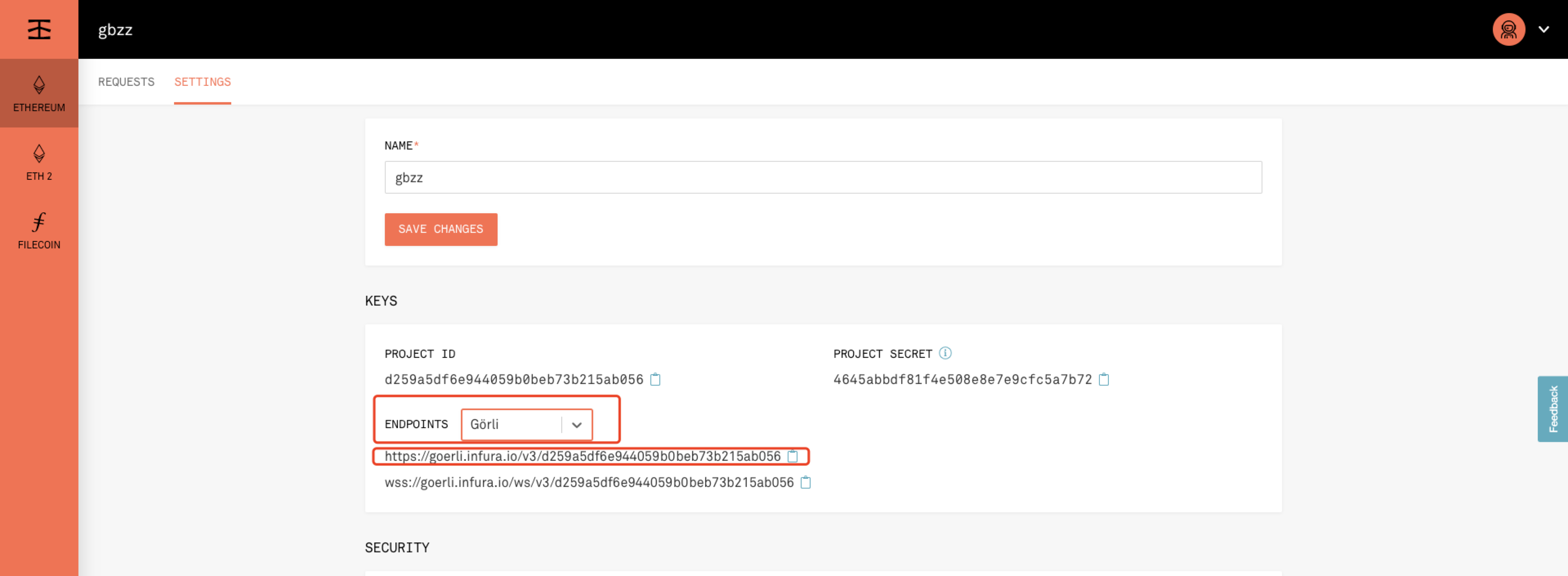
    <content type="html"><![CDATA[<h1 id="在以太坊测试网络-Goerli-部署-Swarm"><a href="#在以太坊测试网络-Goerli-部署-Swarm" class="headerlink" title="在以太坊测试网络 Goerli 部署 Swarm"></a>在以太坊测试网络 Goerli 部署 Swarm</h1><p>以下主要以 Linux 系统为例，Darwin 类似。</p><h2 id="Quick-Start"><a href="#Quick-Start" class="headerlink" title="Quick Start"></a>Quick Start</h2><h3 id="安装-Bee-Clef"><a href="#安装-Bee-Clef" class="headerlink" title="安装 Bee Clef"></a>安装 Bee Clef</h3><p>这个服务负责签名，是 Bee 节点的前置依赖之一。</p><p><strong>Ubuntu / Debian / Raspbian</strong></p><p>执行命令，通过 deb 包安装</p><pre><code class="bash">wget https://github.com/ethersphere/bee-clef/releases/download/v0.4.9/bee-clef_0.4.9_amd64.debsudo dpkg -i bee-clef_0.4.9_amd64.deb</code></pre><p><strong>CentOS</strong></p><pre><code class="bash">wget https://github.com/ethersphere/bee-clef/releases/download/v0.4.9/bee-clef_0.4.9_amd64.rpmsudo rpm -i bee-clef_0.4.9_amd64.rpm</code></pre><p><strong>MacOS</strong></p><pre><code class="bash">brew tap ethersphere/tapbrew install swarm-clef</code></pre><p>运行服务</p><pre><code class="bash">brew services start swarm-clef</code></pre><h3 id="安装-Bee"><a href="#安装-Bee" class="headerlink" title="安装 Bee"></a>安装 Bee</h3><p>Bee 节点是分布式存储服务的主体服务。</p><p><strong>Ubuntu / Debian / Raspbian</strong></p><p>执行命令，通过 deb 包安装</p><pre><code class="bash">wget https://github.com/ethersphere/bee/releases/download/v0.5.3/bee_0.5.3_amd64.debsudo dpkg -i bee_0.5.3_amd64.deb</code></pre><p><strong>CentOS</strong></p><pre><code class="bash">wget https://github.com/ethersphere/bee/releases/download/v0.5.3/bee_0.5.3_amd64.rpmsudo rpm -i bee_0.5.3_amd64.rpm</code></pre><p><strong>MacOS</strong></p><pre><code class="bash">brew tap ethersphere/tapbrew install swarm-bee</code></pre><p>运行服务</p><pre><code class="bash">brew services start swarm-bee</code></pre><h2 id="运行属于自己的-Goerli-节点"><a href="#运行属于自己的-Goerli-节点" class="headerlink" title="运行属于自己的 Goerli 节点"></a>运行属于自己的 Goerli 节点</h2><p>安装好工具之后，可以使用默认的配置运行 bee 节点，但是默认 bee 节点连接的以太坊测试网络的 endpoint 为：<a href="https://rpc.slock.it/goerli" target="_blank" rel="noopener">https://rpc.slock.it/goerli</a>, 这个入口很容易被堵塞(发送的交易请求过多)，进而导致 bee 节点无法正常工作，报错如下：</p><pre><code class="bash">Error: get chain id: Post &quot;https://rpc.slock.it/goerli&quot;: dial tcp 87.117.121.163:443: i/o timeout</code></pre><p>为此安装属于个人的 Goerli endpoint，进入：<a href="https://infura.io/，创建项目" target="_blank" rel="noopener">https://infura.io/，创建项目</a></p><p><img src="/images/blockchain/ethereum/swarm/infura_create_project.png" alt=""><br>创建之后选择测试网络 Goerli，记录保存 endpoint 地址：<br><img src="/images/blockchain/ethereum/swarm/infura_endpoint.png" alt=""></p><p>将地址替换配置文件</p><pre><code class="bash">vim /etc/bee/bee.yaml...# swap-endpoint: https://rpc.slock.it/goerli 注释默认测试网络swap-endpoint: https://goerli.infura.io/v3/6a542820bd61406e98c3a682312eb9ed...</code></pre><h3 id="运行-bee-节点"><a href="#运行-bee-节点" class="headerlink" title="运行 bee 节点"></a>运行 bee 节点</h3><p>运行 bee 节点准备存储工作（挖矿）。</p>]]></content>
    
    <summary type="html">


        &lt;h1 id=&quot;在以太坊测试网络-Goerli-部署-Swarm&quot;&gt;&lt;a href=&quot;#在以太坊测试网络-Goerli-部署-Swarm&quot; class=&quot;headerlink&quot; title=&quot;在以太坊测试网络 Goerli 部署 Swarm&quot;&gt;&lt;/a&gt;在以太坊测试网络 Goerl
      
    
    </summary>
    
    
      <category term="Blockchain" scheme="https://banbanpeppa.github.io/tags/Blockchain/"/>
    
      <category term="Ethereum" scheme="https://banbanpeppa.github.io/tags/Ethereum/"/>
    
      <category term="Swarm" scheme="https://banbanpeppa.github.io/tags/Swarm/"/>
    
  </entry>
  
  <entry>
    <title>AngularJS使用Echarts</title>
    <link href="https://banbanpeppa.github.io/2020/01/13/angularjs/ng-echarts/"/>
    <id>https://banbanpeppa.github.io/2020/01/13/angularjs/ng-echarts/</id>
    <published>2020-01-13T03:27:23.847Z</published>
    <updated>2020-01-15T04:00:10.518Z</updated>
    
    <content type="html"><![CDATA[<p>🤪</p><p>Echarts提供了非常强大的可视化功能，在平时的开发过程中难免用到echarts来助力数据展示。</p><p>那么在Angularjs中该如何使用echarts呢？下面撸一个例子方便后面参考。</p><h2 id="指令-amp-echarts"><a href="#指令-amp-echarts" class="headerlink" title="指令&amp;echarts"></a>指令&amp;echarts</h2><p>AngularJS中的指令是一种特有的处理DOM节点的方式，它可以操作以及渲染可重用的UI组件。例如想要用AngularJS处理echarts的一个柱状图📊，则可以通过下面的方式操作</p><pre><code class="js">angular.module(&#39;demo&#39;)    .directive(&#39;myBarChart&#39;, function($window) { //定义柱状图指令        return {            restrict: &#39;EA&#39;, // 以属性或者tag的形式调用指令            link: function($scope, element, attrs) {  //attrs 是DOM元素的属性集合                var myBarChart = echarts.init(element[0]); // element是一个jqlite对象，如果JQuery再AngularJS之前引入，则是一个Jquery对象，可以使用Jquery所有的方法                $scope.$watch(attrs.eData, function(newVal, oldVal, scope) {//监听属性e-data的值，当数据发生改变时执行作为第二个参数的函数                    var xData = [],                        sData = [],                        data = newVal,                        totalCount = 0;                    angular.forEach(data, function(val) {                        xData.push(val.name);                        sData.push(val.value);                        totalCount += val.value;                    });                    var option = {                        title: {                            text: &#39;用户访问来源统计&#39;,                            subtext: &#39;总计值:&#39; + totalCount,                            x: &#39;center&#39;,                        },                        color: [&#39;#333642&#39;],                        tooltip: {                            trigger: &#39;axis&#39;,                            axisPointer: {                                type: &#39;shadow&#39;                            }                        },                        grid: {                            left: &#39;3%&#39;,                            right: &#39;4%&#39;,                            bottom: &#39;3%&#39;,                            containLabel: true                        },                        xAxis: [{                            type: &#39;category&#39;,                            data: xData,                            axisTick: {                            alignWithLabel: true                            }                        }],                        yAxis: [{                            type: &#39;value&#39;                        }],                        series: [{                            name: &#39;直接访问&#39;,                            type: &#39;bar&#39;,                            barWidth: &#39;60%&#39;,                            data: sData                        }]                    };                    myBarChart.setOption(option);                }, true);                $window.onresize = function() {                    myBarChart.resize();                }            }        }    });</code></pre><p>通过指令处理好了组件之后，便可以在之后的开发中使用组件。</p><h2 id="使用echarts指令"><a href="#使用echarts指令" class="headerlink" title="使用echarts指令"></a>使用echarts指令</h2><p><strong>JavaScript</strong></p><pre><code class="js">var app = angular.module(&quot;demo&quot;, []); //定义一个模块angular.module(&quot;demo&quot;).controller(&quot;myCtrl&quot;, function($scope, $http, $interval) {  //定义控制器  $interval(function() {    //调用$interval服务执行循环任务，3秒自动更新一次数据    $http      .get(&quot;/demo_get&quot;) //调用$http服务获取数据      .success(function(data) {        if (data.status == &quot;0&quot;) {          $scope.data = data.data; //将数据放在model中        }      })      .error(function() {        $scope.data[0].value = Math.floor(Math.random() * 2000); //模拟数据改变测试      });  }, 5000);  //假设获取到的数据如下：  var fakeData = {    status: 0,    data: [      {        value: 335,        name: &quot;直接访问&quot;      },      {        value: 310,        name: &quot;邮件营销&quot;      },      {        value: 234,        name: &quot;微信跳转&quot;      },      {        value: 135,        name: &quot;视频广告&quot;      },      {        value: 748,        name: &quot;搜索引擎&quot;      }    ]  };  $scope.data = fakeData.data;});</code></pre><p><strong>HTML</strong></p><pre><code class="html">&lt;div ng-app=&quot;demo&quot; ng-controller=&quot;myCtrl&quot; id=&quot;demo&quot;&gt;  &lt;div style=&quot;height:320px;&quot; my-bar-chart e-data=&quot;data&quot;&gt;&lt;/div&gt;&lt;/div&gt;</code></pre><p>整体效果可以参考：<a href="https://codepen.io/zhilingsomnus/pen/mdyjqKX?editors=1010" target="_blank" rel="noopener">https://codepen.io/zhilingsomnus/pen/mdyjqKX?editors=1010</a></p>]]></content>
    
    <summary type="html">


        &lt;p&gt;🤪&lt;/p&gt;
&lt;p&gt;Echarts提供了非常强大的可视化功能，在平时的开发过程中难免用到echarts来助力数据展示。&lt;/p&gt;
&lt;p&gt;那么在Angularjs中该如何使用echarts呢？下面撸一个例子方便后面参考。&lt;/p&gt;
&lt;h2 id=&quot;指令-amp-echarts&quot;&gt;
      
    
    </summary>
    
    
      <category term="AngularJS" scheme="https://banbanpeppa.github.io/tags/AngularJS/"/>
    
  </entry>
  
  <entry>
    <title>[转] 关于 Angular 里的 $q 和 Promise</title>
    <link href="https://banbanpeppa.github.io/2019/11/10/angularjs/promise/"/>
    <id>https://banbanpeppa.github.io/2019/11/10/angularjs/promise/</id>
    <published>2019-11-10T15:25:18.619Z</published>
    <updated>2019-11-10T15:27:33.878Z</updated>
    
    <content type="html"><![CDATA[<p>链接：<a href="https://llp0574.github.io/2016/12/07/All-about-and-Promises-in-Angular/" target="_blank" rel="noopener">关于 Angular 里的 $q 和 Promise</a></p>]]></content>
    
    <summary type="html">


        &lt;p&gt;链接：&lt;a href=&quot;https://llp0574.github.io/2016/12/07/All-about-and-Promises-in-Angular/&quot; target=&quot;_blank&quot; rel=&quot;noopener&quot;&gt;关于 Angular 里的 $q 和 Pr
      
    
    </summary>
    
    
      <category term="AngularJS" scheme="https://banbanpeppa.github.io/tags/AngularJS/"/>
    
  </entry>
  
  <entry>
    <title>Logstash性能调优</title>
    <link href="https://banbanpeppa.github.io/2019/11/10/bigdata/elk/logstash_performance_tuning/"/>
    <id>https://banbanpeppa.github.io/2019/11/10/bigdata/elk/logstash_performance_tuning/</id>
    <published>2019-11-10T13:32:52.629Z</published>
    <updated>2019-11-10T13:53:10.781Z</updated>
    
    <content type="html"><![CDATA[<h1 id="Logstash性能调优"><a href="#Logstash性能调优" class="headerlink" title="Logstash性能调优"></a>Logstash性能调优</h1><p><a href="https://www.elastic.co/guide/en/logstash/current/performance-tuning.html" target="_blank" rel="noopener">详细调优参考</a></p><h2 id="Inputs和Outputs的性能"><a href="#Inputs和Outputs的性能" class="headerlink" title="Inputs和Outputs的性能"></a>Inputs和Outputs的性能</h2><p>当输入输出源的性能已经达到上限，那么性能瓶颈不在Logstash，应优先对输入输出源的性能进行调优。  </p><h2 id="系统性能指标："><a href="#系统性能指标：" class="headerlink" title="系统性能指标："></a>系统性能指标：</h2><ul><li>CPU<ul><li>确定CPU使用率是否过高，如果CPU过高则先查看JVM堆空间使用率部分，确认是否为GC频繁导致，如果GC正常，则可以通过调节Logstash worker相关配置来解决。</li></ul></li><li>内存<ul><li>由于Logstash运行在JVM上，因此注意调整JVM堆空间上限，以便其有足够的运行空间。另外注意Logstash所在机器上是否有其他应用占用了大量内存，导致Logstash内存磁盘交换频繁。</li></ul></li><li>I/O使用率<br>1）磁盘IO：<br>  磁盘IO饱和可能是因为使用了会导致磁盘IO饱和的创建（如file output）,另外Logstash中出现错误产生大量错误日志时也会导致磁盘IO饱和。Linux下可以通过iostat, dstat等查看磁盘IO情况<br>2）网络IO：<br>  网络IO饱和一般发生在使用有大量网络操作的插件时。linux下可以使用dstat或iftop等查看网络IO情况<br>3）JVM堆检查：    <pre><code>1、如果JVM堆大小设置过小会导致GC频繁，从而导致CPU使用率过高  2、快速验证这个问题的方法是double堆大小，看性能是否有提升。注意要给系统至少预留1GB的空间。  3、为了精确查找问题可以使用jmap或VisualVM。[参考](https://www.elastic.co/guide/en/logstash/current/tuning-logstash.html#profiling-the-heap)4、设置Xms和Xmx为相同值，防止堆大小在运行时调整，这个过程非常消耗性能。</code></pre>4）Logstash worker设置：<br>worker相关配置在logstash.yml中，主要包括如下三个：<ul><li>pipeline.workers：<br>该参数用以指定Logstash中执行filter和output的线程数，当如果发现CPU使用率尚未达到上限，可以通过调整该参数，为Logstash提供更高的性能。建议将Worker数设置适当超过CPU核数可以减少IO等待时间对处理过程的影响。实际调优中可以先通过-w指定该参数，当确定好数值后再写入配置文件中。</li><li>pipeline.batch.size:<br>该指标用于指定单个worker线程一次性执行flilter和output的event批量数。增大该值可以减少IO次数，提高处理速度，但是也以为这增加内存等资源的消耗。当与Elasticsearch联用时，该值可以用于指定Elasticsearch一次bluck操作的大小。</li><li>pipeline.batch.delay:<br>该指标用于指定worker等待时间的超时时间，如果worker在该时间内没有等到pipeline.batch.size个事件，那么将直接开始执行filter和output而不再等待。</li></ul></li></ul>]]></content>
    
    <summary type="html">


        &lt;h1 id=&quot;Logstash性能调优&quot;&gt;&lt;a href=&quot;#Logstash性能调优&quot; class=&quot;headerlink&quot; title=&quot;Logstash性能调优&quot;&gt;&lt;/a&gt;Logstash性能调优&lt;/h1&gt;&lt;p&gt;&lt;a href=&quot;https://www.elastic.c
      
    
    </summary>
    
    
      <category term="Big Data" scheme="https://banbanpeppa.github.io/tags/Big-Data/"/>
    
      <category term="ELK" scheme="https://banbanpeppa.github.io/tags/ELK/"/>
    
  </entry>
  
  <entry>
    <title>AngularJS实现input autofocus属性</title>
    <link href="https://banbanpeppa.github.io/2019/10/10/angularjs/ng-focus/"/>
    <id>https://banbanpeppa.github.io/2019/10/10/angularjs/ng-focus/</id>
    <published>2019-10-10T04:06:31.701Z</published>
    <updated>2019-10-11T11:47:05.906Z</updated>
    
    <content type="html"><![CDATA[<h1 id="AngularJS实现input-focus聚焦"><a href="#AngularJS实现input-focus聚焦" class="headerlink" title="AngularJS实现input focus聚焦"></a>AngularJS实现input focus聚焦</h1><p>AngularJS通过指令的新属性来扩展HTML，其内置了许多指令来为应用添加功能，最常见的指令如<code>ng-app</code>、<code>ng-model</code>、<code>ng-bind</code>等等，同时AngularJS还提供了用户自定义指令功能。</p><p><strong>通过derective实现自定义focus聚焦</strong></p><p>为了能够让input标签具有自动获取焦点的能力，可以通过自定义一个指令来实现。具体的实现如下</p><pre><code class="js">var app = angular.module(&#39;plunker&#39;, []);var MyCtrl = function ($scope, $timeout) {};app.directive(&#39;customFocus&#39;, function($timeout) {  return {    scope: { trigger: &#39;=customFocus&#39; },    link: function(scope, element) {      scope.$watch(&#39;trigger&#39;, function(value) {        if(value === true) {           $timeout(function() {            element[0].focus();            scope.trigger = false;          });        }      });    }  };});</code></pre><p>之后在html的input标签中可以这么使用</p><pre><code class="html">&lt;html ng-app=&quot;plunker&quot;&gt;  &lt;head&gt;    &lt;script src=&quot;https://ajax.googleapis.com/ajax/libs/angularjs/1.0.4/angular.js&quot;&gt;&lt;/script&gt;    &lt;script src=&quot;example.js&quot;&gt;&lt;/script&gt;    &lt;link href=&quot;https://netdna.bootstrapcdn.com/twitter-bootstrap/2.2.2/css/bootstrap-combined.min.css&quot; rel=&quot;stylesheet&quot;&gt;  &lt;/head&gt;  &lt;body&gt;&lt;div ng-controller=&quot;MyCtrl&quot;&gt;    &lt;button class=&quot;btn&quot;  ng-click=&quot;showForm=true;focusInput=true&quot;&gt;show form and focus input&lt;/button&gt;    &lt;div ng-show=&quot;showForm&quot;&gt;      &lt;input type=&quot;text&quot; custom-focus=&quot;focusInput&quot;&gt;      &lt;button class=&quot;btn&quot; ng-click=&quot;showForm=false&quot;&gt;hide form&lt;/button&gt;    &lt;/div&gt;&lt;/div&gt;  &lt;/body&gt;&lt;/html&gt;</code></pre><p><a href="https://codepen.io/marco27384/pen/GqgZXo" target="_blank" rel="noopener">【示例】</a></p>]]></content>
    
    <summary type="html">


        &lt;h1 id=&quot;AngularJS实现input-focus聚焦&quot;&gt;&lt;a href=&quot;#AngularJS实现input-focus聚焦&quot; class=&quot;headerlink&quot; title=&quot;AngularJS实现input focus聚焦&quot;&gt;&lt;/a&gt;AngularJS实现inp
      
    
    </summary>
    
    
      <category term="AngularJS" scheme="https://banbanpeppa.github.io/tags/AngularJS/"/>
    
  </entry>
  
  <entry>
    <title>v2ray + websocket + nginx</title>
    <link href="https://banbanpeppa.github.io/2019/10/09/essay/v2ray_ws/"/>
    <id>https://banbanpeppa.github.io/2019/10/09/essay/v2ray_ws/</id>
    <published>2019-10-09T15:01:00.000Z</published>
    <updated>2019-10-11T11:42:05.840Z</updated>
    
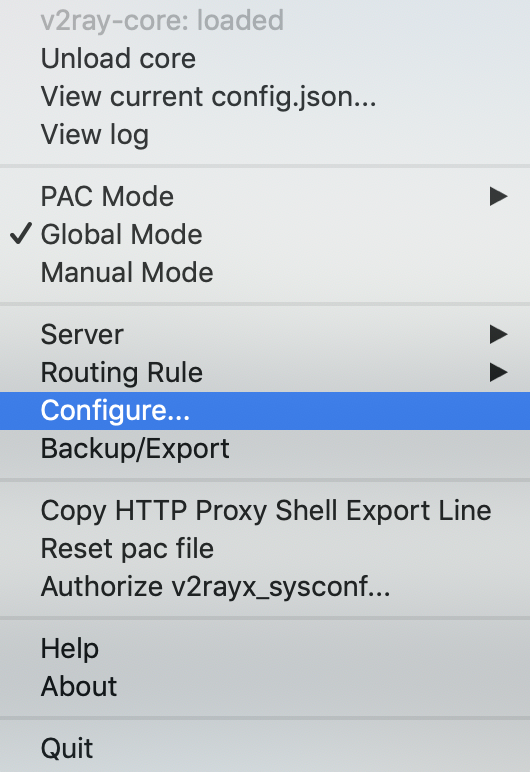
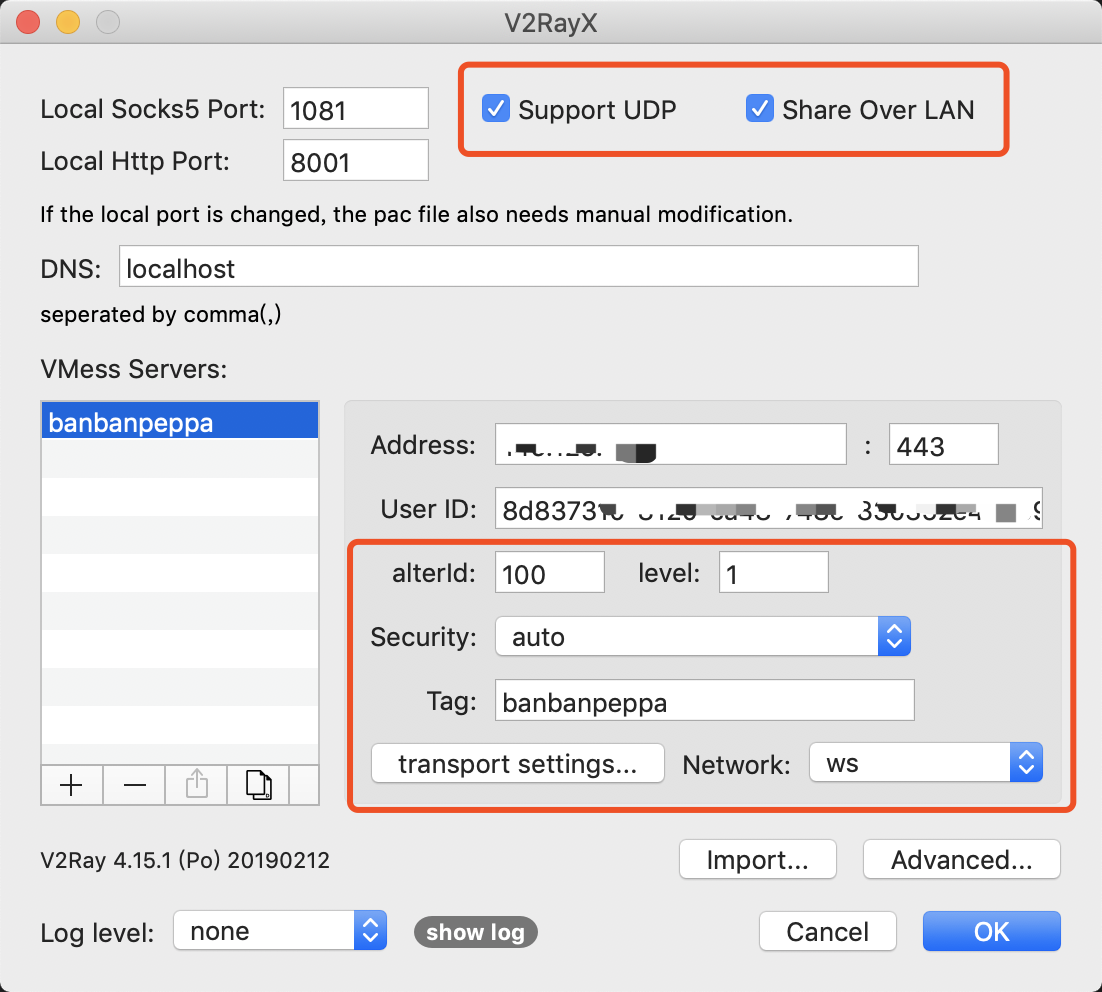
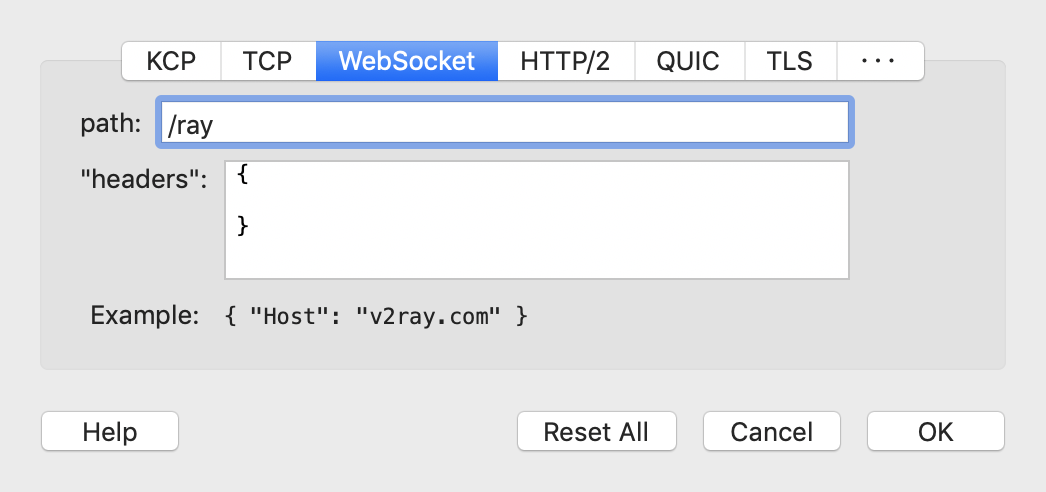
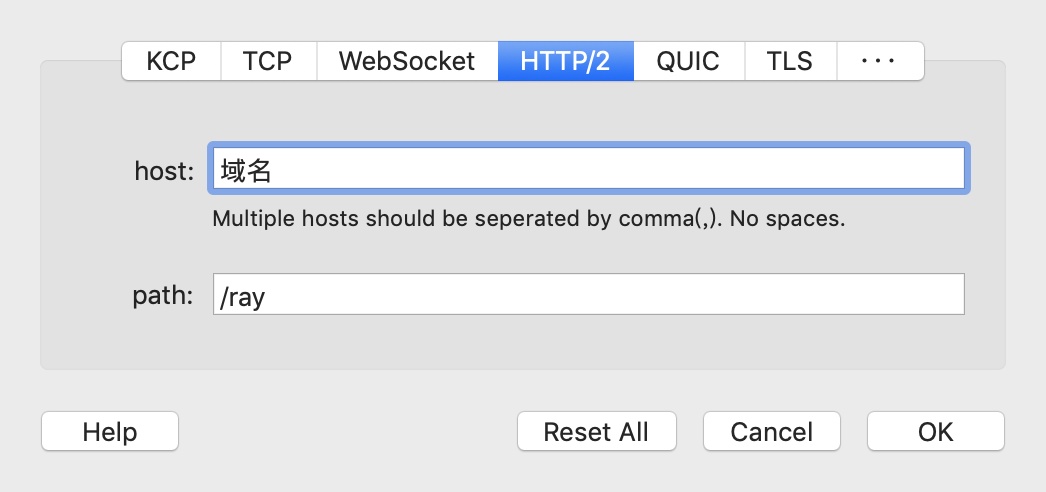
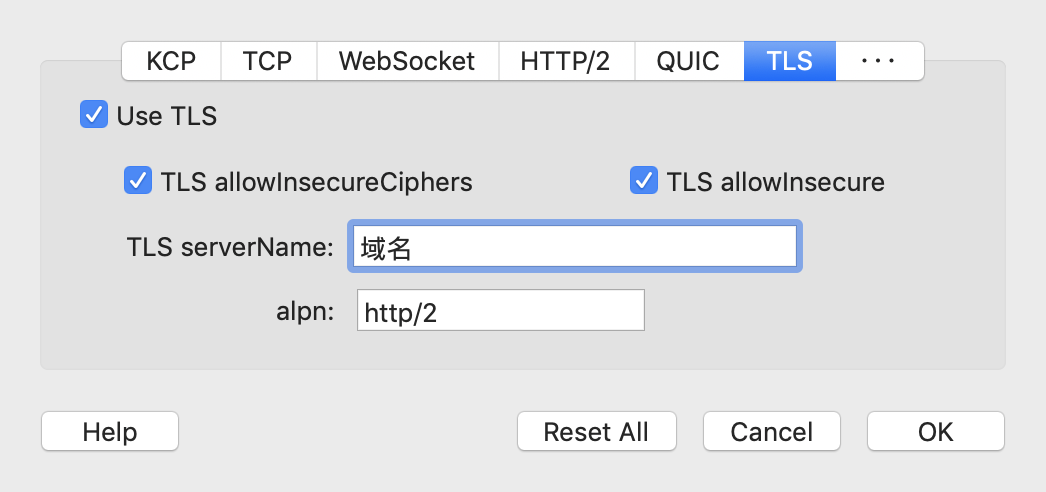
    <content type="html"><![CDATA[<h2 id="安装v2ray"><a href="#安装v2ray" class="headerlink" title="安装v2ray"></a>安装v2ray</h2><pre><code class="bash">bash &lt;(curl -L -s https://install.direct/go.sh)systemctl status v2ray</code></pre><h2 id="配置v2ray"><a href="#配置v2ray" class="headerlink" title="配置v2ray"></a>配置v2ray</h2><p>具体的做法和另一篇文章<a href="/2019/03/29/essay/v2ray/">《搭建v2ray》</a>一样，只是其中的配置文件替换为用websocket，如下</p><pre><code class="json">{  &quot;log&quot; : {    &quot;access&quot;: &quot;/var/log/v2ray/access.log&quot;,    &quot;error&quot;: &quot;/var/log/v2ray/error.log&quot;,    &quot;loglevel&quot;: &quot;warning&quot;  },  &quot;inbound&quot;: {    &quot;port&quot;: 9000,    &quot;listen&quot;: &quot;127.0.0.1&quot;,    &quot;protocol&quot;: &quot;vmess&quot;,    &quot;settings&quot;: {      &quot;clients&quot;: [        {          &quot;id&quot;: &quot;8d837310-8120-ca48-748e-830359e454b9&quot;,          &quot;level&quot;: 1,          &quot;alterId&quot;: 64        }      ]    },   &quot;streamSettings&quot;:{      &quot;network&quot;: &quot;ws&quot;,      &quot;wsSettings&quot;: {           &quot;path&quot;: &quot;/v2ray&quot;      }   }  },  &quot;outbound&quot;: {    &quot;protocol&quot;: &quot;freedom&quot;,    &quot;settings&quot;: {}  },  &quot;outboundDetour&quot;: [    {      &quot;protocol&quot;: &quot;blackhole&quot;,      &quot;settings&quot;: {},      &quot;tag&quot;: &quot;blocked&quot;    }  ],  &quot;routing&quot;: {    &quot;strategy&quot;: &quot;rules&quot;,    &quot;settings&quot;: {      &quot;rules&quot;: [        {          &quot;type&quot;: &quot;field&quot;,          &quot;ip&quot;: [            &quot;0.0.0.0/8&quot;,            &quot;10.0.0.0/8&quot;,            &quot;100.64.0.0/10&quot;,            &quot;127.0.0.0/8&quot;,            &quot;169.254.0.0/16&quot;,            &quot;172.16.0.0/12&quot;,            &quot;192.0.0.0/24&quot;,            &quot;192.0.2.0/24&quot;,            &quot;192.168.0.0/16&quot;,            &quot;198.18.0.0/15&quot;,            &quot;198.51.100.0/24&quot;,            &quot;203.0.113.0/24&quot;,            &quot;::1/128&quot;,            &quot;fc00::/7&quot;,            &quot;fe80::/10&quot;          ],          &quot;outboundTag&quot;: &quot;blocked&quot;        }      ]    }  }}</code></pre><h2 id="配置nginx"><a href="#配置nginx" class="headerlink" title="配置nginx"></a>配置nginx</h2><p>安装</p><pre><code class="bash">apt install nginx</code></pre><p>配置<code>/etc/nginx/conf.d/v2ray.conf</code>，如下</p><pre><code class="json">/etc/nginx/conf.d# cat v2ray.conf server {    listen 443;    server_name ip.address.of.your.vps;    location /v2ray {        proxy_redirect off;        proxy_pass http://127.0.0.1:9000;        proxy_http_version 1.1;        proxy_set_header Upgrade $http_upgrade;        proxy_set_header Connection &quot;upgrade&quot;;        proxy_set_header Host $http_host;    }}</code></pre><p>为了允许访问者访问nginx站点，您需要打开端口80和443：</p><pre><code class="bash">apt install -y firewalldfirewall-cmd --permanent --zone=public --add-service=http firewall-cmd --permanent --zone=public --add-service=httpsfirewall-cmd --reload</code></pre><h2 id="配置V2rayX"><a href="#配置V2rayX" class="headerlink" title="配置V2rayX"></a>配置V2rayX</h2><p>启动v2rayx之后会有这样一个图标<br><img src="/images/essay/v2ray/v2rayx_status.png" alt="image"><br>点击Configure进入配置<br><img src="/images/essay/v2ray/v2rayx_config.png" alt="image"><br><img src="/images/essay/v2ray/v2rayx_config_detail.png" alt="image"><br>接下来点击transport settings进入配置</p><p>配置websocket<br><img src="/images/essay/v2ray/v2rayx_ws_config.png" alt="image"><br>配置http/2<br><img src="/images/essay/v2ray/v2rayx_http_config.png" alt="image"><br>配置tls<br><img src="/images/essay/v2ray/v2rayx_tls_config.png" alt="image"></p><p>在开启服务端V2ray和nginx服务后，Google it！</p><h1 id="Reference"><a href="#Reference" class="headerlink" title="Reference"></a>Reference</h1><ul><li><a href="https://segmentfault.com/a/1190000018242765" target="_blank" rel="noopener">V2ray+websocket+tls+caddy+serverSpeeder</a></li><li><a href="https://www.muzilong.cn/storage/html/185/blog.itswcg.com/2019-02/update-vpn.html" target="_blank" rel="noopener">科学上网2.0：v2ray+websocket+nginx</a></li><li><a href="https://www.xpath.org/blog/001531048571577582cfa0ea2804e5f9cb224de052a4975000" target="_blank" rel="noopener">v2ray +tls + websocket + nginx 配置与使用</a></li></ul>]]></content>
    
    <summary type="html">


        &lt;h2 id=&quot;安装v2ray&quot;&gt;&lt;a href=&quot;#安装v2ray&quot; class=&quot;headerlink&quot; title=&quot;安装v2ray&quot;&gt;&lt;/a&gt;安装v2ray&lt;/h2&gt;&lt;pre&gt;&lt;code class=&quot;bash&quot;&gt;bash &amp;lt;(curl -L -s https://
      
    
    </summary>
    
    
      <category term="随笔" scheme="https://banbanpeppa.github.io/tags/%E9%9A%8F%E7%AC%94/"/>
    
  </entry>
  
  <entry>
    <title>rsync - 文件同步与传输神器</title>
    <link href="https://banbanpeppa.github.io/2019/09/18/linux/rsync/"/>
    <id>https://banbanpeppa.github.io/2019/09/18/linux/rsync/</id>
    <published>2019-09-18T06:44:00.000Z</published>
    <updated>2019-10-01T09:19:38.523Z</updated>
    
    <content type="html"><![CDATA[<h1 id="文件同步神器-——-Rsync"><a href="#文件同步神器-——-Rsync" class="headerlink" title="文件同步神器 —— Rsync"></a>文件同步神器 —— Rsync</h1><p><img src="/images/linux/rsynclogo.jpg" alt="image"></p><p>Rsync作为文件同步工具，其在许多场景下都提供了便捷。为了实现文件传输，用户会使用<code>scp</code>工具，🤠<code>scp</code>工具是基于ssh协议来设计的，其在安全性上面优势明显，但是如果存在如下场景，<code>scp</code>无疑是一种比较浪费资源并且比较低效的做法：</p><p>当传输的文件经常面临修改或者发生变更，例如代码，使用scp会全量进行覆盖，每一次都会进行所有文件的复制，并且覆盖。</p><p>这个时候通常会采用<code>rsync</code>的方式来同步文件，实现增量式传输文件，这样能够极大提升文件的传输效率。</p><h2 id="scp-vs-rsync"><a href="#scp-vs-rsync" class="headerlink" title="scp vs rsync"></a>scp vs rsync</h2><p>1. 对比默认参数下, 两种方式消耗的系统资源情况</p><ul><li>在都是空目录的情况下同步信息，scp和rsync的执行效率相当，在一个量级，但是当已经同步过一次之后，在后续同步内容的过程中会看到同步的效率rsync快了非常多，这是因为scp是复制，而rsync是覆盖。</li></ul><p>2. 在服务器端存在对应服务的条件下</p><ul><li>scp是加密的</li><li>rsync本身是不加密的，除非配置了使用ssh通道或者vpn通道，为此ysync的传输效率会比较高。</li></ul><p>3. scp和rsync的具体适用场景</p><ul><li>如果是频繁更新的文件并且是小文件，则建议使用rsync</li><li>如果是很少更新的文件，建议使用scp，简单方便快捷，同时还是加密传输</li></ul><h2 id="rsync安装"><a href="#rsync安装" class="headerlink" title="rsync安装"></a>rsync安装</h2><p>rsync 命令在大部分的Unix或者Linux系统上面都预装了，如果没有安装，则可以通过下面的命令来安装。</p><p>在CentOS &amp; RHEL系统上执行</p><pre><code class="sh">yum install rsync -y</code></pre><p>在Debian系操作系统中(Ubuntu &amp; Linux Mint)执行</p><pre><code class="sh">apt install rsync -y</code></pre><h2 id="rsync命令"><a href="#rsync命令" class="headerlink" title="rsync命令"></a>rsync命令</h2><p><img src="/images/linux/rsync-command-example-linux.jpg" alt="image"></p><p>rsync的命令参数主要包括如下</p><pre><code class="js">rsync      -a  归档模式，表示以递归方式传输文件，并保持所有属性    -r  对于目录以递归模式处理，主要针对目录，传输的是目录必须加-r    -v  打印一些信息出来，比如速率，文件数量等。    -l  保留软连链    -L  向对待常规文件一样处理软链接，如果是src(源机)中有软链接文件，刚加上该选项后会把软连接指向的目标文件拷贝到dst（目标机）    -p  保持文件权限    -o  保持文件属主信息    -g  保持文件属组信息    -D  保持 设备文件信息    -t  保持 文件时间信息    --delete 删除那些dst中src没有的文件    --exclude=PATTERN指定排除不需要传输的文件，等号后面跟文件名，可以是万用字符模式（如*.txt）        PATTERN路径是相对弄要同步的路径如(rsync -avPz --exclude=zabbix /opt/sh 10.8.64.99::backup/tmp/ #排除的是/opt/sh/zabbix)    --progress或-P 在同步的过程中可以看到同步的过程状态，比如统计要同步的文件数量，同步的文件传输速度等等。。。    --bwlimit=10 （限制传输速度）    -u  加上这个选项后将会把DST中比SRC还新的文件排除掉，不会覆盖    -z  压缩   传输的过程中会压缩，我们并不会感知。 文件到了目标机器上我们看到的是一样的。    （工作中常用的几个 -a  -v  --delete  --exclude）</code></pre><p>使用rsync传输文件有两种模式，一种是通过<code>ssh</code>隧道来传输，另一种是通过连接服务端的<code>rsync daemon</code>来传输。</p><p>一下举一些例子来说明两种传输模式。</p><pre><code>rsync同步ssh隧道方式：#后面的目录是目标地址    例1：rsync -avPz 192.168.183.109:/tmp/1.txt /tmp/   拉文件：远程到本机    例2：rsync -avPz /tmp/1.txt  192.168.183.109:/tmp/   推文件：本机到远程    例3：rsync -avPz -e &quot;ssh -p 10022&quot; /tmp/1.txt  192.168.183.109:/tmp/   推文件：本机到远程，端口不是22的情况rsync同步daemon方式    例1：不需要密码   学ssh免密码登陆    rsync -auvPz --bwlimit=10 （限制传输速度） tmp.txt test@&lt;ip&gt;::test --password-file=~/.rsync.password    例2：查询rsyncd可用模块   (list参数，yes会显示，no不会显示)    rsync -list --port 8873  192.168.186.118::</code></pre><h2 id="rsync-daemon"><a href="#rsync-daemon" class="headerlink" title="rsync daemon"></a>rsync daemon</h2><p>rsync通过daemon的方式启动一个服务端，让客户端连接服务端完成文件传输。daemon的可以分不同模块来处理不同的rsync请求。</p><p>为了能够启动一个服务端rsync daemon，需要按照如下例子配置</p><p>创建<code>/etc/rsyncd.conf</code>配置文件，内容如下</p><pre><code class="conf">port=8873log file=/var/log/rsync.logpid file=/var/run/rsyncd.pidaddress=192.168.0.11 # 本机IP地址[mkdocs]path=/home/banban/mkdocsuse chroot=truemax connections=4read only=nolist=trueuid=banbangid=banbanauth users=chenzhilingsecrets file=/etc/rsyncd.passwd# pre-xfer exec=/home/banban/deploy.shpost-xfer exec=/home/banban/deploy.shhosts allow=192.168.0.1/32</code></pre><p>解释一下每一个参数的含义</p><pre><code class="conf">port：说明启动rsyncd服务的端口号，默认是873。log file：日志文件位置。pid file：服务文件。address：启动rsyncd服务的本机IP地址[]：rsync的模块path：rsync需要同步的目录位置，这里指明为/home/banban/mkdocsuse chroot true|false：是否需要root权限来同步max connections：指定最大的连接数。list：当用户查询该服务器上的可用模块时，是否列出这个模块。uid/gid：banbanauth users：banbansecrets file：指定密码文件，该参数连同上面的参数如果不指定，则不使用密码验证。注意该密码文件的权限一定要是600。hosts allow：表示被允许连接该模块的主机，其中前面两个IP是作业给出的另外两台机器的IP，最后一个是通过在办公网下使用dig -x 反解得到的gitlab的ip</code></pre><blockquote><p>具体关于<code>rsyncd.conf</code>的配置可以参考: <a href="https://download.samba.org/pub/rsync/rsyncd.conf.html" target="_blank" rel="noopener">https://download.samba.org/pub/rsync/rsyncd.conf.html</a></p></blockquote><p>创建密码文件<code>/etc/rsyncd.passwd</code></p><pre><code class="bash">echo &quot;chenzhiling:xxxxx&quot; &gt; /etc/rsyncd.passwdchmod 600 /etc/rsyncd.passwd</code></pre><blockquote><p>注意：这个文件的权限一定要设置为600，文件内容格式[rsync-user:password]</p></blockquote><p>启动服务</p><pre><code class="bash">rsync --daemon --config=/etc/rsyncd.conf</code></pre><p>为了方便rsync的服务管理，可以使用下面这个脚本</p><pre><code class="bash">#!/bin/bash # this script for start|stop rsync daemon service status1=$(ps -ef | egrep &quot;rsync --daemon&quot; | grep -v &#39;grep&#39;) pidfile=&quot;/var/run/rsyncd.pid&quot; start_rsync=&quot;rsync --daemon --config=/etc/rsyncd.conf&quot; function rsyncstart() {     if [ &quot;${status1}X&quot; == &quot;X&quot; ];then         rm -f $pidfile               ${start_rsync}           status2=$(ps -ef | egrep &quot;rsync --daemon.*rsyncd.conf&quot; | grep -v &#39;grep&#39;)         if [  &quot;${status2}X&quot; != &quot;X&quot;  ];then             echo &quot;rsync service start.......OK&quot;           fi     else         echo &quot;rsync service is running !&quot;        fi } function rsyncstop() {     if [ &quot;${status1}X&quot; != &quot;X&quot; ];then         kill -9 $(cat $pidfile)         status2=$(ps -ef | egrep &quot;rsync --daemon&quot; | grep -v &#39;grep&#39;)         if [ &quot;${statusw2}X&quot; == &quot;X&quot; ];then             echo &quot;rsync service stop.......OK&quot;         fi     else         echo &quot;rsync service is not running !&quot;        fi } function rsyncstatus() {     if [ &quot;${status1}X&quot; != &quot;X&quot; ];then         echo &quot;rsync service is running !&quot;       else          echo &quot;rsync service is not running !&quot;     fi } function rsyncrestart() {     if [ &quot;${status1}X&quot; == &quot;X&quot; ];then         echo &quot;rsync service is not running...&quot;         rsyncstart     else         rsyncstop         rsyncstart    fi       }  case $1 in     &quot;start&quot;)         rsyncstart         ;;     &quot;stop&quot;)         rsyncstop         ;;     &quot;status&quot;)         rsyncstatus         ;;     &quot;restart&quot;)         rsyncrestart         ;;     *)        echo             echo  &quot;Usage: `basename $0` start|stop|restart|status&quot;         echo esac</code></pre><p>启动了服务之后，便可以通过客户端传输文件</p><pre><code class="bash">rsync -avz --port 8873 ./ chenzhiling@&lt;ip&gt;::mkdocs/</code></pre>]]></content>
    
    <summary type="html">


        &lt;h1 id=&quot;文件同步神器-——-Rsync&quot;&gt;&lt;a href=&quot;#文件同步神器-——-Rsync&quot; class=&quot;headerlink&quot; title=&quot;文件同步神器 —— Rsync&quot;&gt;&lt;/a&gt;文件同步神器 —— Rsync&lt;/h1&gt;&lt;p&gt;&lt;img src=&quot;/images/
      
    
    </summary>
    
    
      <category term="Linux" scheme="https://banbanpeppa.github.io/tags/Linux/"/>
    
  </entry>
  
  <entry>
    <title>懒人神器autojump</title>
    <link href="https://banbanpeppa.github.io/2019/09/16/linux/autojump/"/>
    <id>https://banbanpeppa.github.io/2019/09/16/linux/autojump/</id>
    <published>2019-09-16T05:59:00.000Z</published>
    <updated>2019-09-16T07:17:02.754Z</updated>
    
    <content type="html"><![CDATA[<p><img src="/images/linux/autojump.jpg" alt="image"></p><h2 id="What-is-autojump"><a href="#What-is-autojump" class="headerlink" title="What is autojump"></a>What is autojump</h2><p><code>autojump</code>是一个类似于<code>cd</code>命令的工具，它可以快速定位到目录或者文件，其实现的基本原理是由于<code>autojump</code>维护了一个目录访问历史表，如果出现目录名同名的情况，<code>autojump</code>会根据不同目录的访问频率来设置对应的权重，权重高的优先进入。</p><p>开源地址：<a href="https://github.com/wting/autojump" target="_blank" rel="noopener">https://github.com/wting/autojump</a></p><h2 id="Installation"><a href="#Installation" class="headerlink" title="Installation"></a>Installation</h2><p><code>autojump</code>的安装主要在Linux和Mac系统下面，目前在Windows下面还没有直接的支持。</p><h3 id="Debian-Ubuntu"><a href="#Debian-Ubuntu" class="headerlink" title="Debian/Ubuntu"></a>Debian/Ubuntu</h3><p>安装</p><pre><code class="bash">apt install -y autojump</code></pre><p>在Debian系系统中，需要手动激活<code>autojump</code>，为了暂时激活 autojump 应用，即直到你关闭当前会话或打开一个新的会话之前让 autojump 均有效，你需要以常规用户身份运行下面的命令:</p><pre><code class="bash">source /usr/share/autojump/autojump.sh on startup</code></pre><p>为了使得 autojump 在 BASH shell 中永久有效，你需要运行下面的命令。</p><pre><code class="bash">echo &#39;. /usr/share/autojump/autojump.sh&#39; &gt;&gt; ~/.bashrc</code></pre><p>关于autojump的文档放在</p><pre><code class="bash">cat /usr/share/doc/autojump/README.Debian</code></pre><h3 id="CentOS"><a href="#CentOS" class="headerlink" title="CentOS"></a>CentOS</h3><p>安装</p><pre><code class="bash">yum install epel-releaseyum install autojump或dnf install autojump</code></pre><h3 id="关于shell"><a href="#关于shell" class="headerlink" title="关于shell"></a>关于shell</h3><p>对于特别的shell例如zsh或者fish，可以使用不同的autojump版本,在zsh下使用 <code>autojump-zsh</code> ，在fish下使用<code>autojump-fish</code>。</p><h3 id="MacOS"><a href="#MacOS" class="headerlink" title="MacOS"></a>MacOS</h3><p>直接通过brew进行安装</p><pre><code class="bash">brew install autojump</code></pre><p>默认安装的位置是</p><pre><code class="bash">/usr/local/Cellar/autojump/</code></pre><p>不同版本都放在这个目录下面。</p><p>在安装过程中可能会询问一些配置的步骤，根据提示配置即可。</p><p>安装好之后，如果是使用默认的bash，执行</p><pre><code class="bash">bash /usr/local/Cellar/autojump/22.5.3/share/autojump/autojump.bash</code></pre><p>同时将下列配置添加到<code>~/.bash_profile</code>中</p><pre><code class="bash"># Set autojump env. /usr/local/Cellar/autojump/22.5.3/share/autojump/autojump.bash</code></pre><p>如果是<code>oh-my-zsh</code>作为用户shell，则配置plugin，添加如下配置内容到<code>~/.zshrc</code>中</p><pre><code class="bash">plugins=(... autojump)</code></pre><p>其中省略号表示别的plugin。</p><h2 id="Usage"><a href="#Usage" class="headerlink" title="Usage"></a>Usage</h2><p>auto的使用很简单，通过-h可以看到其主要的功能</p><pre><code class="bash">chenzhiling@banban:~ ➜ j -h usage: autojump [-h] [-a DIRECTORY] [-i [WEIGHT]] [-d [WEIGHT]] [--complete]                [--purge] [-s] [-v]                [DIRECTORY [DIRECTORY ...]]Automatically jump to directory passed as an argument.positional arguments:  DIRECTORY             directory to jump tooptional arguments:  -h, --help            show this help message and exit  -a DIRECTORY, --add DIRECTORY                        add path  -i [WEIGHT], --increase [WEIGHT]                        increase current directory weight  -d [WEIGHT], --decrease [WEIGHT]                        decrease current directory weight  --complete            used for tab completion  --purge               remove non-existent paths from database  -s, --stat            show database entries and their key weights  -v, --version         show version informationPlease see autojump(1) man pages for full documentation.</code></pre><p><code>autojump</code>的别名是<code>j</code>，很简约</p><pre><code class="bash">chenzhiling@banban:~ ➜ j -s________________________________________0:     total key weight0:     stored directories0.00:     current directory weightdata:    /Users/chenzhiling/Library/autojump/autojump.txt</code></pre><p>刚安装的时候，autojump没有记录任何信息，因此总权重为0。</p><p>在使用了一段时间<code>cd</code>命令之后，autojump自然而然会记录一些目录访问记录，如下</p><pre><code class="bash">chenzhiling@banban:~ ➜ j -s...65.6:   /Users/chenzhiling/dev/nodejs-workspace67.8:   /Users/chenzhiling/dev/nodejs-workspace/devteam/x-ui67.8:   /Users/chenzhiling/dev/nodejs-workspace/devteam81.2:   /Users/chenzhiling/dev/python-workspace/devteam/x-server________________________________________2806:    total weight168:     number of entries0.00:    current directory weightdata:    /Users/chenzhiling/Library/autojump/autojump.txt</code></pre><p>这样权重最高的会优先被遍历，例如想要快速跳转到<code>x-server</code>这个目录下面</p><pre><code class="bash">j x-server</code></pre><p>便可以直接跳转到<code>/Users/chenzhiling/dev/python-workspace/devteam/x-server</code>这个目录下面，省去了很长的目录输入。</p><p>如果<code>autojump</code>还没有记录的那些目录你想要直接跳转，是不行的，至少需要使用<code>cd</code>进入到对应的目录一次，才有可能用<code>autojump</code>，否则会直接跳转到<code>.</code>。</p><p>Enjoy it！</p>]]></content>
    
    <summary type="html">


        &lt;p&gt;&lt;img src=&quot;/images/linux/autojump.jpg&quot; alt=&quot;image&quot;&gt;&lt;/p&gt;
&lt;h2 id=&quot;What-is-autojump&quot;&gt;&lt;a href=&quot;#What-is-autojump&quot; class=&quot;headerlink&quot; title=&quot;Wh
      
    
    </summary>
    
    
      <category term="Linux" scheme="https://banbanpeppa.github.io/tags/Linux/"/>
    
  </entry>
  
  <entry>
    <title>Elasticsearch的安装与使用</title>
    <link href="https://banbanpeppa.github.io/2019/09/16/bigdata/elk/elasticsearch/"/>
    <id>https://banbanpeppa.github.io/2019/09/16/bigdata/elk/elasticsearch/</id>
    <published>2019-09-16T01:36:29.376Z</published>
    <updated>2019-09-18T06:54:09.117Z</updated>
    
    <content type="html"><![CDATA[<h1 id="Elasticsearch"><a href="#Elasticsearch" class="headerlink" title="Elasticsearch"></a>Elasticsearch</h1><p><img src="/images/bigdata/elk/elk.jpg" alt="image"></p><h2 id="Getting-Started"><a href="#Getting-Started" class="headerlink" title="Getting Started"></a><del>Getting Started</del></h2><p>Elasticsearch是一个高可扩展的开源全文检索和分析引擎。它提供了快速实时进行存储、查询和分析海量数据的功能。这个工具通常用于那些需要复杂查询功能和需求的场景，我们将Elasticsearch作为一个底层引擎技术来驱动顶层应用。</p><p>以下是一些简单的使用Elasticsearch的用例</p><ul><li>在一个在线电商平台中，需要允许用户对不同的商品进行搜索，商品的种类繁多，需要能够及时返回比较精准的结果。这个时候就可以使用Elasticsearch来存储所有商品的分类和清单，之后Elasticsearch来提供其强大的搜索功能。</li><li>在一些场景下，用户想要对大量的日志文件进行分析，从中的得到一些关于产品的使用趋势、统计结果以及一些异常情况，以此来进一步驱动产品进步。在这种情况下，用户可以使用Logstash（ELK的L）来对日志进行采集、聚合和解析，之后Logstash将处理好的日志落到Elasticsearch，只要数据落到了Elasticsearch，用户便可以使用它的强大的搜索和聚合功能来获取自己想要的结果内容。</li><li>在用户使用某一个电商平台的过程中，可能用户对某一个商品感兴趣，但是可能用户暂时不能接受当前价格，这时候用户可能希望设置一个阈值，在商品价格降低到对应这个价格的时候就通过某种方式通知用户，用户能够在第一时间获取得到该商品降价的信息。这个可以通过Elasticsearch来实现，Elasticsearch通过其反向查询的能力，对商品价格进行查询，当价格满足了条件既可以通过告警系统将消息发送给用户。</li><li>在一些场景下，用户会需要对大量的数据进行快速审查、分析以及获取数据的可视化结果，可以使用Elasticsearch进行数据存储，使用Kibana来对数据进行显示，Kibana是一个数据可视化的dashboard，它可以展示一系列对用户来说很重要的数据，用户可以定制对应显示的数据内容。另一方变，用户还可以使用Elasticsearch强大的聚合能力来进行复杂得多商业数据查询。</li></ul><h2 id="Introduction"><a href="#Introduction" class="headerlink" title="Introduction"></a>Introduction</h2><p>Elasticsearch是Elastic Stack（简称ES）的核心分布式检索和分析组件，Logstash和Beats主要用于将数据进行采集、聚合以及处理数据，然后将数据存储到Elasticsearch，Kibana则将处理好的数据进行可视化，并且对数据进行一些操作与监控。而那些索引、检索以及分析的核心功能都是在Elasticsearch中完成的。</p><p>Elasticsearch提供了实时检索与分析数据的能力，不管是结构化的数据还是非结构化的数据、数字化数据、地理数据等，Elasticsearch都能够高效地进行存储并建立索引，同时实现高效检索能力。用户可以远远超出简单的检索和聚合信息，以发现数据中的趋势和模式，达到数据分析的目的。随着数据和查询量的增长，Elasticsearch的分布式特性使得部署能够随之无缝增长，实现动态扩展的能力。</p><p>在现实业务中，显然不是每一个问题都是搜索问题，但是Elasticsearch提供了处理各种数据的速度和灵活性，以下是一些用例：</p><ul><li>将搜索框添加到应用或者网站中，这个时候可以使用ES</li><li>存储和分析日志、指标和安全事件数据</li><li>使用机器学习手段来自动模型化实时数据的行为</li><li>只用Elasticsearch作为全自动化商务流程的引擎</li><li>把Elasticsearch作为GIS来管理、集成和分析地理数据</li></ul><h2 id="基本概念"><a href="#基本概念" class="headerlink" title="基本概念"></a>基本概念</h2><p>在Elasticsearch中有一些核心概念，掌握这些概念有助于对Elasticsearch的理解。</p><h3 id="NRT（Near-Realtime）近实时"><a href="#NRT（Near-Realtime）近实时" class="headerlink" title="NRT（Near Realtime）近实时"></a>NRT（Near Realtime）近实时</h3><p>Elasticsearch是一个近实时的搜索平台，也就是说Elasticsearch在对某一个文档建立好index之后到进入可搜索阶段会有一个时延（通常是一秒钟）。</p><h3 id="Cluster"><a href="#Cluster" class="headerlink" title="Cluster"></a>Cluster</h3><p>集群通常指的是由一台或者多台服务节点组成的节点，这些节点存储了完整的数据内容，并且对这些数据提供了联合索引，用户可以通过所有的节点进行数据检索。一个集群通常会由一个独一的名称进行标识（默认使用“elasticsearch”），这个名称很重要，一个节点在加入了某一个名称的集群之后，只能属于某一个集群。</p><p>所以在一些环境下，要确保针对不同的集群没有使用相同的名称，否则可能就会出现一些节点加入错误的情况。例如，用户可以定义名为<code>logging-dev</code>、 <code>logging-stage</code>或者<code>logging-prod</code>的名字来区分不同的es集群。</p><p>需要注意的是，一个集群是完全支持只存在一个节点的情况的。</p><h3 id="Node"><a href="#Node" class="headerlink" title="Node"></a>Node</h3><p>一个节点就是一个集群的一部分，节点存储了数据，参与到一个集群中提供其索引和搜索的能力。同集群有点类似，一个节点由一个UUID来标识，如果不想使用UUID，用户可以自顶一个名称来标识节点。</p><p>一个节点可以通过配置加入到某一个特定的集群中，默认一个节点直接加入到名为”elasticsearch“集群中。假设在一个分布式环境下，有一些es节点启动并且能够相互发现，他们会自组织形成一个名为<code>elasticsearch</code>的集群，并加入到这个集群中。</p><p>在一个集群下，可以容纳任意多的节点。</p><h3 id="Index"><a href="#Index" class="headerlink" title="Index"></a>Index</h3><p>Index是一系列有相同或者相似特征的文档，例如对于用户数据，可以为其定义一个<code>customer index</code>，对于商品类目，可以定义另一个index为<code>catagory</code>，一个index由一个名称来表示，而这个index会在后续的索引、检索、更新以及删除文档等操作的时候使用。</p><p>在一个单独的集群中，可以为文档定义任意多的index。</p><h3 id="Type-（6-0-0版本之后弃用"><a href="#Type-（6-0-0版本之后弃用" class="headerlink" title="Type （6.0.0版本之后弃用)"></a><del>Type （6.0.0版本之后弃用)</del></h3><p>在一个index下面的逻辑分区，能够将不同类型的文档归类到同一个index下面。例如，一个文档类型是<code>users</code>的类型，另一类的文档类型是<code>blog posts</code>类型，这两个类型可以放在同一个index的不同分区下面，也就是不同的type下面。</p><p>这个概念在后续的es版本中已经弃用了。具体可以参考<a href="https://www.elastic.co/guide/en/elasticsearch/reference/6.0/removal-of-types.html" target="_blank" rel="noopener">Removal of mapping types</a>。</p><h3 id="Document"><a href="#Document" class="headerlink" title="Document"></a>Document</h3><p>在前面有提到文档的概念，一个文档是一个能够被index的最小单元，例如可以为一个单独的顾客定义一个文档，也可以为一个单独的商品定义一个文档。这个文档通常是用JSON来表示。</p><p>在一个index或者type下，可以存储任意多的文档，需要注意的是，一个文档虽然物理位置上面来说是在一个index下面的，但是一个文档必须详细分配到index下面的某一个type下。</p><h3 id="Shards-amp-Replicas"><a href="#Shards-amp-Replicas" class="headerlink" title="Shards &amp; Replicas"></a>Shards &amp; Replicas</h3><p>在一个index下面可能会存储非常大量的文档（数据），这些数据有可能会超出一个节点的硬件限制。例如，在一个单独的index下面有超过1TB的文档，这个可能会超过一个节点的磁盘容量或者可能会导致查询的效率非常的慢。</p><p>为了解决这个问题，Elasticsearch将index进行再分割为一个一个shards（分片），当定义了一个index的时候，用户可以指定对应的shards（分片）数，每个分片本身都是一个功能齐全且独立的“索引”，可以托管在集群中的任何节点上。</p><p>分片之所以很重要有两个很重要的原因：</p><ul><li>分片允许用户水平分割或者水平扩展内容卷</li><li>允许用户跨分片（分片可能分布在不同的节点上面）分布和并行化操作，进而提高系统的性能和吞吐量</li></ul><p>在一个复制的分布式环境或者云环境中，不可预期的一些故障是可能出现的，为此强烈建议使用Elasticsearch提出的故障转移机制，以防止某一个节点因为宕机或者其它一些原因不可用而导致数据丢失。Elasticsearch允许对每一个分片都进行副本复制，称为分片副本。</p><p>副本很重要的原因主要有两个：</p><ul><li>可以在分片或者节点出现故障的时候提供系统的可用性，因此需要注意副本分片需要与原始分片分布在不同的节点上面。</li><li>能够实现扩展的搜索量和吞吐量，因为可以在所有的副本上面（包括原始分片）进行并行搜索。</li></ul><p>总而言之，每一个index（索引）的都可以划分为多个分片，同时针对每一个索引都可以为其分片进行副本复制，复制之后，每个索引都将具有朱分片和副本分片。在创建index的时候可以为每一个index定义分片和副本的数目，创建索引之后，用户可以动态地更改副本数，但是不能修改分片数目。</p><p>默认情况下，Elasticsearch中的每个索引都会有5个主分片和一个副本，这就因为这在集群中至少需要两个节点（副本要和主分片在不同节点），即索引会包含5个主分片和5个副本分片，总计每个索引10个分片。</p><h2 id="Installation"><a href="#Installation" class="headerlink" title="Installation"></a>Installation</h2><p>本人在进行实验的时候Elasticsearch的最新版本是<code>7.3.2</code>，视情况而定下载对应的镜像，具体镜像在<a href="https://www.docker.elastic.co/" target="_blank" rel="noopener">www.docker.elastic.co</a>。</p><p>设置镜像的版本号</p><pre><code>export ELK_VERSION=7.3.2</code></pre><h3 id="docker-run"><a href="#docker-run" class="headerlink" title="docker run"></a>docker run</h3><p>用docker方式来安装会比较快捷方便，接下来主要通过<code>docker run</code>的方式来部署一个ES集群。</p><h4 id="Elasticsearch-1"><a href="#Elasticsearch-1" class="headerlink" title="Elasticsearch"></a>Elasticsearch</h4><p><img src="/images/docker/docker-tiny.png" alt="image"></p><p>下载镜像</p><pre><code class="bash">docker pull docker.elastic.co/elasticsearch/elasticsearch:${ELK_VERSION}</code></pre><p>使用docker run的方式启动</p><pre><code class="bash">docker run -p 9200:9200 -p 9300:9300 -e &quot;discovery.type=single-node&quot; -it -d --name es-node docker.elastic.co/elasticsearch/elasticsearch:7.3.2</code></pre><h4 id="Kibana"><a href="#Kibana" class="headerlink" title="Kibana"></a>Kibana</h4><p>Kibana是ELK的dashboard，可以通过Kibana实现数据的可视化，对数据进一步分析。</p><p>拉取Kibana的镜像</p><pre><code class="bash">docker pull docker.elastic.co/kibana/kibana:${ELK_VERSION}</code></pre><p>启动Kibana服务的方式也有两种，一种是通过docker run的方式，另一种是通过docker-compose的方式。</p><p>首先介绍docker run的方式。</p><pre><code class="bash">docker run --link YOUR_ELASTICSEARCH_CONTAINER_NAME_OR_ID:elasticsearch -p 5601:5601 docker.elastic.co/kibana/kibana:${ELK_VERSION}</code></pre><p>这里运行成功的前提是elasticsearch容器启动的时候网络用的是default，否则需要制定对应的网络。</p><p>在运行的过程中，由于Kibana服务的启动过程中有很多参数可以设置，为此不建议通过环境变量一个一个写，可以通过挂载的方式将<code>kibana.yaml</code>的配置文件挂载过去，<code>kibana.yaml</code>配置文件(7.3版本)的具体配置要求在这个<a href="https://www.elastic.co/guide/en/kibana/7.3/settings.html" target="_blank" rel="noopener">链接</a></p><p>则启动方式添加参数</p><pre><code class="bash">docker run --link YOUR_ELASTICSEARCH_CONTAINER_NAME_OR_ID:elasticsearch -p 5601:5601 -v ./kibana.yml:/usr/share/kibana/config/kibana.yml docker.elastic.co/kibana/kibana:${ELK_VERSION}</code></pre><h3 id="docker-compose"><a href="#docker-compose" class="headerlink" title="docker-compose"></a>docker-compose</h3><h4 id="Elasticsearch-2"><a href="#Elasticsearch-2" class="headerlink" title="Elasticsearch"></a>Elasticsearch</h4><p>可以通过docker-compose的方式启动,docker-compose的yaml文件如下</p><p><code>elasticsearch.yaml</code></p><pre><code class="yaml">version: &#39;3&#39;services:  es01:    image: docker.elastic.co/elasticsearch/elasticsearch:${ELK_VERSION}    container_name: es01    environment:      - node.name=es01      - discovery.seed_hosts=es02      - cluster.initial_master_nodes=es01,es02      - cluster.name=docker-cluster      - bootstrap.memory_lock=true      - &quot;ES_JAVA_OPTS=-Xms512m -Xmx512m&quot;    ulimits:      memlock:        soft: -1        hard: -1    volumes:      - esdata01:/usr/share/elasticsearch/data    ports:      - 9200:9200    networks:      - esnet  es02:    image: docker.elastic.co/elasticsearch/elasticsearch:${ELK_VERSION}    container_name: es02    environment:      - node.name=es02      - discovery.seed_hosts=es01      - cluster.initial_master_nodes=es01,es02      - cluster.name=docker-cluster      - bootstrap.memory_lock=true      - &quot;ES_JAVA_OPTS=-Xms512m -Xmx512m&quot;    ulimits:      memlock:        soft: -1        hard: -1    volumes:      - esdata02:/usr/share/elasticsearch/data    networks:      - esnetvolumes:  esdata01:    driver: local  esdata02:    driver: localnetworks:  esnet:</code></pre><p>另外将镜像的版本添加到<code>.env</code>文件中（和elasticsearch.yaml文件同一个目录)</p><p><code>.env</code></p><pre><code class="ini">ELK_VERSION=7.3.2</code></pre><p>然后直接执行</p><pre><code class="bash">docker-compose -f elasticsearch.yaml up -d</code></pre><p>创建好之后查看docker容器运行情况</p><pre><code class="bash"># docker ps -aCONTAINER ID        IMAGE                                                              COMMAND                  CREATED             STATUS              PORTS                              NAMES4b8cc899cb3f        docker.elastic.co/elasticsearch/elasticsearch:7.3.2                &quot;/usr/local/bin/do...&quot;   6 minutes ago       Up 6 minutes        9200/tcp, 9300/tcp                 es02992ed17bfeb9        docker.elastic.co/elasticsearch/elasticsearch:7.3.2                &quot;/usr/local/bin/do...&quot;   6 minutes ago       Up 6 minutes        0.0.0.0:9200-&gt;9200/tcp, 9300/tcp   es01</code></pre><p>访问Elasticsearch的接口</p><pre><code class="bash">$ curl http://127.0.0.1:9200/_cat/health1568624275 08:57:55 docker-cluster green 2 2 0 0 0 0 0 0 - 100.0%</code></pre><p>安装成功</p><h4 id="Kibana-1"><a href="#Kibana-1" class="headerlink" title="Kibana"></a>Kibana</h4><p>结合之前的elasticsearch容器启动，追加内容得到</p><p><code>elasticsearch.yaml</code></p><pre><code class="yaml">version: &#39;3&#39;services:  es01:    image: docker.elastic.co/elasticsearch/elasticsearch:${ELK_VERSION}    container_name: es01    environment:      - node.name=es01      - discovery.seed_hosts=es02      - cluster.initial_master_nodes=es01,es02      - cluster.name=docker-cluster      - bootstrap.memory_lock=true      - &quot;ES_JAVA_OPTS=-Xms512m -Xmx512m&quot;    ulimits:      memlock:        soft: -1        hard: -1    volumes:      - esdata01:/usr/share/elasticsearch/data    ports:      - 9200:9200    networks:      - esnet  es02:    image: docker.elastic.co/elasticsearch/elasticsearch:${ELK_VERSION}    container_name: es02    environment:      - node.name=es02      - discovery.seed_hosts=es01      - cluster.initial_master_nodes=es01,es02      - cluster.name=docker-cluster      - bootstrap.memory_lock=true      - &quot;ES_JAVA_OPTS=-Xms512m -Xmx512m&quot;    ulimits:      memlock:        soft: -1        hard: -1    volumes:      - esdata02:/usr/share/elasticsearch/data    networks:      - esnet  kibana:    image: docker.elastic.co/kibana/kibana:${ELK_VERSION}    container_name: kibana    environment:      SERVER_NAME: testing-chenzhiling.loghub.netease.com      ELASTICSEARCH_HOSTS: http://es01:9200    ports:      - 5601:5601    links:      - &#39;es01:es01&#39;    networks:      - esnetvolumes:  esdata01:    driver: local  esdata02:    driver: localnetworks:  esnet:</code></pre><p>然后执行</p><pre><code class="bash">docker-compose -f elacticsearch.yaml up -d</code></pre><p>启动成功之后访问 <a href="http://127.0.0.1:5601" target="_blank" rel="noopener">http://127.0.0.1:5601</a> 可以进入Kibana的界面<br><img src="/images/bigdata/elk/kibana_dashboard.png" alt="image"></p>]]></content>
    
    <summary type="html">


        &lt;h1 id=&quot;Elasticsearch&quot;&gt;&lt;a href=&quot;#Elasticsearch&quot; class=&quot;headerlink&quot; title=&quot;Elasticsearch&quot;&gt;&lt;/a&gt;Elasticsearch&lt;/h1&gt;&lt;p&gt;&lt;img src=&quot;/images/bigdata/
      
    
    </summary>
    
    
      <category term="Big Data" scheme="https://banbanpeppa.github.io/tags/Big-Data/"/>
    
      <category term="ELK" scheme="https://banbanpeppa.github.io/tags/ELK/"/>
    
  </entry>
  
  <entry>
    <title>Linux空洞文件</title>
    <link href="https://banbanpeppa.github.io/2019/08/21/linux/holefile/"/>
    <id>https://banbanpeppa.github.io/2019/08/21/linux/holefile/</id>
    <published>2019-08-21T06:43:00.000Z</published>
    <updated>2019-08-21T08:23:00.868Z</updated>
    
    <content type="html"><![CDATA[<h2 id="概念"><a href="#概念" class="headerlink" title="概念"></a>概念</h2><p>什么是空洞文件(hole file)？💁‍♂️在Linux中，lseek的系统调用是可以改变在文件上面的偏移量的，而且还允许其超出文件的长度。偏移量一旦超出了文件的长度，下一次进行文件IO写入操作文件的时候便会延续偏移量的位置继续写入，进而在文件中间产生了空洞的部分，这部分会以”\0”填充，而从原来的文件结尾到新写入数据间的这段空间就被称为“<strong>文件空洞</strong>”。</p><p>在Linux中，EOF（文件结束符）并不是一个字符，而是在读取到文件末尾的时候返回的一个信号值，也就是-1。</p><p>文件空洞部分实际上是不会占用任何的物理空间的，直到在某个时刻对空洞部分进行写入文件内容的时候才会为它分配对应的空间。但是在空洞文件形成的时候，逻辑上面的文件大小是分配了空洞部分的大小的。</p><p>👯‍♀️👯‍♂️👯‍♀️👯‍♂️👯‍♀️👯‍♂️👯‍♀️👯‍♂️</p><h2 id="实验"><a href="#实验" class="headerlink" title="实验"></a>实验</h2><p>接下来可以通过一个实验来验证空洞文件的形成，并且使用cat和cp两种方式对空洞文件进行操作，看看他们对应的不同效果。</p><p>首先使用dd命令产生一个空洞文件，具体可以查看dd的使用方法。</p><ul><li>if - 输入文件</li><li>of - 输出文件</li><li>seek - 设置输出文件的偏移量</li><li>skip - 设置输入文件的偏移量</li><li>bs - 是ibs和obs的合集</li></ul><p>接下来从<code>/dev/urandom</code>中读取内容，写入到<code>hole.file</code>文件中，在写入之前，对<code>hole.file</code>文件设置了999的偏移量，bs设置了4096的大小，同时设置写入的block数量为1，这样将会产生一个逻辑长度为1000数据块的文件。</p><pre><code>~$ dd if=/dev/urandom of=hole.file bs=4096 seek=999 count=11+0 records in1+0 records out4096 bytes (4.1 kB, 4.0 KiB) copied, 0.000449329 s, 9.1 MB/s</code></pre><p>产生之后，使用ls命令查看文件大小是4.0MB</p><pre><code>~$ ls -lh hole.file-rw-r--r-- 1 chenzhiling01 root 4.0M 8月  21 15:12 hole.file</code></pre><p>使用du命令查看文件大小是4.0KB</p><pre><code>~$ du -h hole.file4.0K    hole.file</code></pre><p>相差如此悬殊！！🧐</p><p>使用od命令来查看<code>hole.file</code>文件的二进制内容</p><pre><code>~$ od -c hole.file0000000  \0  \0  \0  \0  \0  \0  \0  \0  \0  \0  \0  \0  \0  \0  \0  \0...</code></pre><p>会看到其实整个<code>hole.file</code>文件的开始是用许多的”\0”来填充的，由于上面设置了偏移量比较大，可以设置小一点的seek来观察。</p><p>接下来使用cat来重定向文件到一个新的文件</p><pre><code>~$ cat hole.file &gt; hole.cat</code></pre><p>再使用cp命令将文件拷贝一份出来</p><pre><code>~$ cp hole.file hole.cp</code></pre><p>使用ls命令查看两个新生文件的大小</p><pre><code>~$ ls -lh hole.cat hole.cp-rw-r--r-- 1 chenzhiling01 root 4.0M 8月  21 15:39 hole.cat-rw-r--r-- 1 chenzhiling01 root 4.0M 8月  21 15:40 hole.cp</code></pre><p>再使用du查看两个新生文件的大小</p><pre><code>~$ du -h hole.cat hole.cp4.0M    hole.cat4.0K    hole.cp</code></pre><p>会看到使用cat重定向得到的文件的大小使用ls和du都是4.0MB，而使用cp命令得到的文件大小信息和原来的文件是一样的。</p><h2 id="总结"><a href="#总结" class="headerlink" title="总结"></a>总结</h2><p>为什么ls和du命令得到的文件大小会相差如此巨大呢？是因为ls获取得到的是文件的逻辑大小，而du获取得到的是文件的实际占用物理块的大小。也就是说，当产生空洞文件的时候，文件系统并不会将空洞文件部分对应也分配好空间，那样是相当浪费的，而且还会被一些黑客利用，在系统中产生大量的空洞文件来耗尽系统的存储资源。</p><p>🦁一个小插曲，我发现ls -sh列出来的大小和du出来的大小是一样的，所以可以认为ls -s所获取得到的是文件实际占用的存储块的大小。</p><p>因此在文件系统上面观察，对应的文件看上去是和普通文件一样，该多大就多大，但是实际上并不会马上为文件分配对应大小的存储。</p><p>而我们使用cat和cp命令得到的文件大小竟然是不一样的，也就是说cp命令和重定向的过程是进行了不一样的操作的。</p><p>cat命令重定向内容到新的文件的时候，其遇到了空洞部分，会用0来填充，这样空洞部分其实也就有了内容了，对应需要为他分配物理存储block，这样文件的真是大小其实就是4MB，但是cp命令在遇到空洞部分的时候，会模拟源文件的空洞调用seek，进行偏移之后再进行内容拷贝，这样其实生成的新文件和源文件是一样的，空洞部分都是不被分配真是存储空间的。</p><h2 id="作用"><a href="#作用" class="headerlink" title="作用"></a>作用</h2><p>空洞文件看上去好像是一个不太靠谱不太安全的操作，但其实在很多情况都很有用：</p><ul><li>像在我们平时使用迅雷下载的时候，刚开始下载但是本地的下载文件就已经好几百兆了，这就利用了空洞文件。为了能够并行下载，创建空洞文件可以让多线程在不同的seek上面开始写入文件，如果不是空洞文件就只能串行写入了。</li><li>在创建虚拟机的时候，我们会使用img工具生成一个例如50GB大小的镜像文件，但是其实在安装完系统之后，镜像的大小可能只有4GB，也就是说img并不会马上就占用掉物理存储空间的50GB，而是在未来使用过程中不断增加的。</li></ul><p>🤓🤓🤓</p><h2 id="参考"><a href="#参考" class="headerlink" title="参考"></a>参考</h2><ul><li><a href="https://blog.csdn.net/shenlanzifa/article/details/44016537" target="_blank" rel="noopener">学习笔记：linux之文件空洞</a></li><li><a href="https://blog.csdn.net/clamercoder/article/details/38361815" target="_blank" rel="noopener">浅析空洞文件</a></li></ul>]]></content>
    
    <summary type="html">


        &lt;h2 id=&quot;概念&quot;&gt;&lt;a href=&quot;#概念&quot; class=&quot;headerlink&quot; title=&quot;概念&quot;&gt;&lt;/a&gt;概念&lt;/h2&gt;&lt;p&gt;什么是空洞文件(hole file)？💁‍♂️在Linux中，lseek的系统调用是可以改变在文件上面的偏移量的，而且还允许其超出文件的长
      
    
    </summary>
    
    
      <category term="Linux" scheme="https://banbanpeppa.github.io/tags/Linux/"/>
    
  </entry>
  
  <entry>
    <title>Linux命令 — grep</title>
    <link href="https://banbanpeppa.github.io/2019/08/15/linux/cmd/grep/"/>
    <id>https://banbanpeppa.github.io/2019/08/15/linux/cmd/grep/</id>
    <published>2019-08-15T08:23:00.000Z</published>
    <updated>2019-08-21T08:08:10.111Z</updated>
    
    <content type="html"><![CDATA[<p>在使用Linux的过程中，经常会遇到在大量文件中查找某一些文件是否包含了某些文件内容的情况。例如在一堆的日志文件里面把出现“memory”字眼的文件过滤出来。</p><p>我们知道用find命令可以使用一些正则表达式来寻找某一些文件，但是却不能够用来寻找文件内是否包含某一些内容。</p><p>grep可以帮我们实现这种效果。</p><h2 id="grep"><a href="#grep" class="headerlink" title="grep"></a>grep</h2><p>grep的中文全称是“全面搜索正则表达式并把行打印出来”，它能使用正则表达式来搜索文本并且将匹配的行打出来。</p><h2 id="常用参数"><a href="#常用参数" class="headerlink" title="常用参数"></a>常用参数</h2><p>首先用grep直接搜索某个文件很简单</p><pre><code>$ grep &quot;import&quot; setup.pyimport ioimport refrom setuptools import setup</code></pre><p>这种输出是最快捷方便的</p><h3 id="r-amp-R"><a href="#r-amp-R" class="headerlink" title="-r &amp; -R"></a>-r &amp; -R</h3><p>如果想再一个目录下搜索所有的包含“import”内容的文件呢？可以使用-r或者-R，当然他们有一点点不一样</p><p>首先在一个独立的测试目录下面创建a、b、c、d文件，这写文件的内容分别如下</p><pre><code>$ for file in {a..d}; do echo &quot;$file:&quot;;cat $file; donea:importb:import testc:import test importimportd:IMPORTimport</code></pre><p>现在分别对d文件创建一个硬链接和软链接</p><pre><code>$ ln d e$ ln -s d f</code></pre><p>于是目录下的文件结构如下</p><pre><code>$ ls -alktotal 20drwxr-xr-x 2 chenzhiling01 root          60 8月  15 17:28 .drwxr-xr-x 6 chenzhiling01 chenzhiling01 93 8月  15 17:15 ..-rw-r--r-- 1 chenzhiling01 root           7 8月  15 16:55 a-rw-r--r-- 1 chenzhiling01 root          12 8月  15 17:27 b-rw-r--r-- 1 chenzhiling01 root          26 8月  15 17:28 c-rw-r--r-- 2 chenzhiling01 root          14 8月  15 17:19 d-rw-r--r-- 2 chenzhiling01 root          14 8月  15 17:19 elrwxrwxrwx 1 chenzhiling01 root           1 8月  15 16:57 f -&gt; d</code></pre><p>先来看</p><pre><code>$ grep -r &#39;import&#39; ././a:import./b:import test./d:import./e:import./c:import test import./c:import</code></pre><p>再使用-R</p><pre><code>$ grep -R &#39;import&#39; ././a:import./b:import test./d:import./e:import./f:import./c:import test import./c:import</code></pre><p>会看到-R得到的结果会比-r多一个文件，这个文件就是f，这个文件是软链接到d文件的，也就是说-R会递归寻找，同时不会忽略掉软链接的文件。</p><h3 id="h-amp-H"><a href="#h-amp-H" class="headerlink" title="-h &amp; -H"></a>-h &amp; -H</h3><p>如果只想看看对应某一个文件内容出现的具体行，而不像要看到对应的文件名，则可以使用-h，而-H则是输出文件名</p><pre><code>$ grep -r -h &quot;import&quot; ./importimport testimportimportimport test importimport</code></pre><pre><code>$ grep -r -H &quot;import&quot; ././a:import./b:import test./d:import./e:import./c:import test import./c:import</code></pre><p>所以如果想值看到文件名，可以结合管道和cut</p><pre><code>$ grep -r -H &quot;import&quot; ./ | cut -d: -f1./a./b./d./e./c./c</code></pre><h3 id="egrep查找"><a href="#egrep查找" class="headerlink" title="egrep查找"></a>egrep查找</h3><p>在一些情况下可能会想找多个内容，则可以使用egrep</p><pre><code>egrep -w -R &#39;word1|word2&#39; ./</code></pre><h3 id="解决错误"><a href="#解决错误" class="headerlink" title="解决错误"></a>解决错误</h3><p>在一些时候可能会出现权限问题或者文件不存在等问题，但是grep默认是不会处理这个错误信息的，可以将错误信息通过重定向或者抑制（-s）的方式</p><pre><code>grep -r -H &quot;import&quot; ./ 2&gt;/dev/nullgrep -r -H -s &quot;import&quot; ./</code></pre><h2 id="参数列表"><a href="#参数列表" class="headerlink" title="参数列表"></a>参数列表</h2><p>grep很强大，我们可以用来过滤自己想要的信息，很多人最常用的就是<code>ps -aux | grep xxx</code>，在日常工作中可以尽可能挖掘他的功能。</p><p>grep的常用参数</p><pre><code>-r – 递归搜索-R – 在每一个目录下面递归搜索，同时会搜索链接的文件。-n – 打印出搜索到的内容在文件中的行-s – 抑制错误的信息，包括文件不存在或者不可读的文件-w – 只根据整个搜索词汇的值来搜索，而不是以正则表达式匹配的形式-i – 忽略大小写去搜索-a - 将 binary 文件以 text 文件的方式搜寻数据-c - 计算找到 &#39;搜寻字符串&#39; 的次数-v - 反向选择，亦即显示出没有 &#39;搜寻字符串&#39; 内容的那一行-E - 使用正则表达式-A - 后面跟数字n，表示显示搜索得到的结果以及前n行-B - 后面跟数字n，表示显示搜索得到的结果以及后n行-C - 后面跟数字n，表示显示搜索得到的结果以及前后n行--color - 对grep出的结果进行颜色区分</code></pre>]]></content>
    
    <summary type="html">


        &lt;p&gt;在使用Linux的过程中，经常会遇到在大量文件中查找某一些文件是否包含了某些文件内容的情况。例如在一堆的日志文件里面把出现“memory”字眼的文件过滤出来。&lt;/p&gt;
&lt;p&gt;我们知道用find命令可以使用一些正则表达式来寻找某一些文件，但是却不能够用来寻找文件内是否包含某一
      
    
    </summary>
    
    
      <category term="Linux" scheme="https://banbanpeppa.github.io/tags/Linux/"/>
    
  </entry>
  
  <entry>
    <title>Linux命令 - find</title>
    <link href="https://banbanpeppa.github.io/2019/08/15/linux/cmd/find/"/>
    <id>https://banbanpeppa.github.io/2019/08/15/linux/cmd/find/</id>
    <published>2019-08-15T08:23:00.000Z</published>
    <updated>2019-08-23T06:38:10.309Z</updated>
    
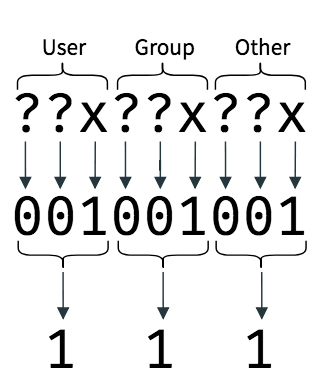
    <content type="html"><![CDATA[<p>find命令让用户能够在系统上根据目录执行文件搜索，同时还可以对结果进行一些后续操作。它是GNU的findutils工具的一个子模块，并且和其他的工具一同形成了强大的文件搜索功能。find工具具有很强的灵活性，可以根据一些特定的条件来搜索文件或者目录，同时还可以根据一些条件参数来处理获取到的结果。</p><h2 id="FindUtils"><a href="#FindUtils" class="headerlink" title="FindUtils"></a>FindUtils</h2><p>GNU Find Utilities是一个在GNU操作系统下基本的文件目录搜索工具集合，这些程式通常用于与其他的一些程式结合一起使用，进而实现模块化的强大的文件目录搜索能力。</p><p>Find Utilities工具主要包含了如下：</p><ul><li>find - 在对应目录下面搜索对应的文件</li><li>locate - 把在数据库中符合一定格式的文件列出来</li><li>updatedb - 更新一个文件名数据库</li><li>xargs - 根据标准输入来构建一个可执行命令</li></ul><p>find工具在一个目录树下去寻找一系列的文件，它会搜寻对应的目录树并且处理得到那些符合用户预设好条件的文件。</p><p>locate工具会搜索一个或者多个文件名的数据库，并且将符合条件的文件名打印出来，通常locate命令会结合updatedb命令使用，updatedb会更新整个系统的文件信息，之后locate命令可以定位到对应的文件内容。locate的查询效率是非常高的，只要对应的database更新了，就能快速定位到文件。</p><p>updatedb程序就是维护一个文件名数据库，这个数据库会被locate程序使用，这个文件名数据库会维护一系列的目录树组成的文件列表，updatedb命令执行的时候会更新对应的目录树，这个程序可以交给cron来做定时更新，每天跟新以此即可。如果再平时使用的时候想要用最新的数据库，手动执行updatedb即可。</p><p>xargs 程序从标准输入流中获取得到一些列内容作为参数，并提供给后续的命令或程序使用，例如一个非常常见的例子就是讲find命令得到的文件名收集在一起作为参数，提供后续的删除操作等等：</p><pre><code>find . -type f | xargs ls -lkh</code></pre><p>具体的FileUtils功能可以查看<a href="https://www.gnu.org/software/findutils/" target="_blank" rel="noopener">Findutils</a></p><h2 id="find的使用"><a href="#find的使用" class="headerlink" title="find的使用"></a>find的使用</h2><p>接下来介绍find命令的使用，同时会根据其提供的参数举例子。</p><p>find命令的基础用法是</p><pre><code class="bash">find [paths] [expression] [actions]</code></pre><p>find命令允许用户传入多个paths，其会根据不同的path递归的去在每一个path下面寻找用户想要的文件，知道全部找完。默认find命令会把paths下面的所有paths都走一遍因为为了能够寻找对应满足一定要求的path下面的文件，可以使用正则表达式来表示对应的path。</p><p>同时find命令也可以对寻找得到的结果进行一些处理，默认是直接输出找到的所有文件，为了能够根据一定的要求来寻找对应的文件，用户可以使用对应的一些action来过滤或者处理文件。</p><p>接下来根据几个例子来加强对find命令的理解</p><h3 id="find-所有的文件和目录"><a href="#find-所有的文件和目录" class="headerlink" title="find 所有的文件和目录"></a>find 所有的文件和目录</h3><p>有时候用户想要将某一个目录下面的所有文件和目录都显示出来，find命令默认能实现这个功能，例如将/usr/bin下面的所有文件找出来</p><pre><code class="bash">$ find /usr/bin//usr/bin//usr/bin/dpkg/usr/bin/dpkg-deb/usr/bin/dpkg-divert/usr/bin/dpkg-maintscript-helper/usr/bin/dpkg-query/usr/bin/dpkg-split/usr/bin/dpkg-statoverride/usr/bin/dpkg-trigger/usr/bin/update-alternatives/usr/bin/debconf/usr/bin/debconf-apt-progress/usr/bin/debconf-communicate/usr/bin/debconf-copydb/usr/bin/debconf-escape/usr/bin/debconf-set-selections/usr/bin/debconf-show/usr/bin/deb-systemd-helper/usr/bin/deb-systemd-invoke/usr/bin/ischroot...</code></pre><p>会看到这个文件列表非常大，因为它把<code>/usr/bin</code>目录下面的所有文件和目录都显示出来了，包括<code>/usr/bin</code>目录本身。</p><p>如果想要从一堆的文件目录中寻找出所有的文件，则可以在find后面追加不同的path</p><pre><code class="bash">find /usr/share /bin /usr/lib</code></pre><p>如果想要把当前目录的所有文件都找出来</p><pre><code class="bash">find .</code></pre><p>或者</p><pre><code class="bash">find</code></pre><h3 id="find-by-name"><a href="#find-by-name" class="headerlink" title="find by name"></a>find by name</h3><p>有时候我们只想根据文件的名字来寻找对应的文件，则可以使用<code>-name</code>的action来实现</p><pre><code class="bash">find . -name hello.txt</code></pre><p>这种方式是根据文件的全名来寻找的，也就是说<code>-name</code>的默认行为就是根据文件的全名来寻找。</p><p>如果说用户不能确定文件的大小写，可以用<code>-iname</code>来寻找</p><pre><code class="bash">find /usr -iname hello.txt</code></pre><p>如果用户连文件的完整名字也无法确定，只想通过模糊匹配的形式来寻找文件，则可以使用正则表达式来寻找</p><pre><code class="bash">find /usr -name &#39;*.txt&#39;</code></pre><p>如果想根据文件名的长度来寻找文件，例如想寻找路径下文件的字符数目是4的文件</p><pre><code class="bash">find /usr -name &#39;????&#39;</code></pre><p>在一些情况下，用户想要寻找某一个特定的目录下面的符合要求的文件，而不是将整个目录中的所有符合要求的文件都显示出来，则可以使用<code>-path</code>。例如一个目录下面有很多目录，现在想要在tmp目录下面寻找出文件名字符数为3的文件或目录，则可以执行</p><pre><code class="bash">find . -path &#39;*tmp/???&#39;</code></pre><p>同时也有一个<code>-ipath</code>的action来忽略掉大小写的操作</p><h3 id="find-文件类型"><a href="#find-文件类型" class="headerlink" title="find 文件类型"></a>find 文件类型</h3><p>在Linux系统下面，所有的东西都是以文件的形式存在。</p><p>在一些情况下，用户不想找出目录，只想找出对应路径下满足条件的文件，这个时候就可以使用<code>-type</code>的action来寻找。</p><p><code>-type</code>的类型比较常见的有</p><ul><li>f: 文件</li><li>d: 目录</li><li>l: 软链接</li></ul><p>例如，找出tmp目录下面出了目录的文件</p><pre><code class="bash">find tmp -type f</code></pre><p>自然，用户可组合不同的actions来寻找文件，例如只找出txt后缀的文件</p><pre><code class="bash">find tmp -type f -name &#39;*.txt&#39;</code></pre><h3 id="find-空文件或者空目录"><a href="#find-空文件或者空目录" class="headerlink" title="find 空文件或者空目录"></a>find 空文件或者空目录</h3><p>find命令支持寻找空的文件或者空的目录</p><pre><code class="bash">find /tmp -empty</code></pre><h3 id="否定action"><a href="#否定action" class="headerlink" title="否定action"></a>否定action</h3><p>find命令可以根据action的否定来处理寻找的文件结果。</p><p>例如可以寻找出了后缀为<code>.txt</code>的文件</p><pre><code class="bash">find . ! -name &#39;*.txt&#39;</code></pre><p>或者寻找出了空文件或者空目录以外的文件</p><pre><code class="bash">find . ! -empty</code></pre><h3 id="根据文件属主寻找"><a href="#根据文件属主寻找" class="headerlink" title="根据文件属主寻找"></a>根据文件属主寻找</h3><p>find命令可以根据文件的属主来寻找。例如想要寻找文件属主为chenzhiling的文件</p><pre><code class="bash">find . -username chenzhiling</code></pre><p><code>-username</code>接受的参数值可以使username或者UID，想要获取对应用户的UID可以通过</p><pre><code class="bash">id -u chenzhiling</code></pre><p>同时也可以根据用户所在的组或者GID来寻找对应的文件</p><pre><code class="bash">find . -group root</code></pre><p>如果想要使用GID来寻找，可以通过下面的命令获取对应的GID</p><pre><code>id -g chenzhiling</code></pre><h3 id="根据文件的时间寻找"><a href="#根据文件的时间寻找" class="headerlink" title="根据文件的时间寻找"></a>根据文件的时间寻找</h3><p>文件在创建之后就会有三个时间跟随着文件。着三个时间分别是mtime、atime、ctime。他们分别表示</p><ul><li>mtime - 文件的内容被修改的时候更新的时间</li><li>atime - 文件被访问的时候被更新的时间</li><li>ctime - 文件的元信息被修改（例如权限）的时候更新的时间</li></ul><p>为此我们可以使用<code>-mtime</code>、<code>-atime</code>、<code>-ctime</code>的action来寻找对应的文件。</p><p>例如寻找在五天内被修改的文件</p><pre><code class="bash">find . -mtime -5 -type f</code></pre><p>寻找在五天以前被修改的文件</p><pre><code class="bash">find . -mtime +5 -type f</code></pre><p>寻找文件在五天前（就在第五天前）被修改的文件</p><pre><code class="bash">find . -mtime 5 -type f</code></pre><p>以此类推另外两个action的用法类似。</p><p>如果觉得使用天来寻找太长了， find还提供了使用<code>mmin</code>、<code>amin</code>、<code>cmin</code>这种分钟级别的action来寻找，例如寻找在5分钟以内被访问的文件</p><pre><code class="bash">find . -type f -amin -5</code></pre><h3 id="根据文件大小来寻找"><a href="#根据文件大小来寻找" class="headerlink" title="根据文件大小来寻找"></a>根据文件大小来寻找</h3><p>在一些时候，用户想要寻找一些大于某个大小或者小于某一个大小的文件，这个时候可以使用<code>-size</code>来寻找</p><pre><code>find . -type f -size -10M</code></pre><p>以上命令把目录下面小于10MB的文件都找出来。</p><p>文件的大小主要分为了4类</p><ul><li>c - bytes</li><li>k - kb</li><li>M - MB</li><li>G - GB</li></ul><h3 id="根据文件权限来寻找"><a href="#根据文件权限来寻找" class="headerlink" title="根据文件权限来寻找"></a>根据文件权限来寻找</h3><p>根据文件权限来寻找文件使用<code>-perm</code>，他有两种方式来寻找，一种是根据权限的标识，另一种用权限的数字。</p><p>我们知道在Linux系统中，文件的权限主要分为了User、Group和Other级别的权限。如下图所示<br><img src="/images/linux/permissions.jpg" alt="image"></p><p>例如要寻找文件权限为<code>rwxr-xr-x</code>的文件，</p><pre><code class="bash">find . -type f -perm u=rwx,g=rx,o=x</code></pre><p>同时为了寻找对于所有的用户权限都是一样的情况，可以使用a来表示，例如寻找文件权限为<code>r-xr-xr-x</code>的文件，这个文件对于所有的用户的权限都是一样的，则可以使用</p><pre><code class="bash">find . -type f -perm a=rx</code></pre><p>为了寻找某一类文件，只想关心它有执行权限<code>x</code>，其他的权限可以设置，也可以没有，这个时候不能只是简单的设置<code>-perm a=x</code>，因为这表示的是要寻找的文件对于所有的用户都只有执行权限，即<code>--x--x--x</code>，这时候可以用<code>-perm /a=x</code>的形式来寻找那些包含了执行权限的文件，但是别的权限为可以是有或者无</p><pre><code class="bash">find . -type f -perm /a=x</code></pre><p>使用权限数字来寻找文件，则直接在<code>-perm</code>后面追加数字为参数即可。例如某一个文件的权限是<code>rwxr-xr-x</code>，这个权限对应的数字表示模式为644，则寻找文件的时候可以</p><pre><code class="bash">find . -type f -perm 644</code></pre><p>同样的，在只想关心某一个权限位的时候，find也有一个表示的方式。例如上面的图中，我们想要找一系列文件，值关心这个文件是否有执行权限<code>x</code>，那么每个权限位置的x位置都设置为1，其它不关心的设置为0，也就是111。这时候在111前面加上<code>-</code>就可以实现只处理权限的子集了。</p><pre><code class="bash">find . -type f -perm -111</code></pre><p>那么如果说使用</p><pre><code>find . -type f -perm -000</code></pre><p>则其实-perm的效果就失效了。</p><h3 id="寻找SUID文件"><a href="#寻找SUID文件" class="headerlink" title="寻找SUID文件"></a>寻找SUID文件</h3><p>在上面学会了使用数字模式的权限寻找文件了，那么如果想要寻找具有SUID权限的文件，其实就是一样的做法，只关心SUID的权限位置，其余权限都不管</p><pre><code class="bash">find .  -type f -perm -4000</code></pre><p>同样的，先刚查看有setuid的权限文件的同时想查看具有执行权限的文件</p><pre><code class="bash">find . -type f -perm -4111</code></pre><p>查看设置了setgid的文件</p><pre><code class="bash">find . -type -f -perm -2000</code></pre><p>查看设置了粘滞位的文件</p><pre><code class="bash">find . -type -f -perm -1000</code></pre><p>这个sticky位比较神奇，有兴趣可以Google一下。</p><p>查看设置了setuid和sticky的该怎么找呢，当然这个属于比较少见到的文件了，权限的格式类似于<code>--s-----t</code>，find命令只要求将这里两个权限数字模式相加即可，也就是5000</p><pre><code class="bash">find . -type f -perm -5000</code></pre><p>如果想要使用权限标识来表示，则可以</p><pre><code class="bash">find . -type f -perm /u=sfind . -type f -perm /g=sfind . -type f -perm /o=t</code></pre><h3 id="设置查询深度"><a href="#设置查询深度" class="headerlink" title="设置查询深度"></a>设置查询深度</h3><p>前面提到了find寻找文件是通过路径去递归查询的，那么有时候有些目录下面的文件深度非常深，则会导致搜索的结果非常庞大。这时候可以使用<code>-maxdepth</code>来限制搜索的深度</p><pre><code class="bash">find . -type f -maxdepth 3</code></pre><p>反过来也可以设置最小的搜索深度</p><pre><code class="bash">find . -type f -mindepth 3</code></pre><h2 id="参考"><a href="#参考" class="headerlink" title="参考"></a>参考</h2><ul><li><a href="https://www.booleanworld.com/guide-linux-find-command/" target="_blank" rel="noopener">A Guide to the Linux “Find” Command</a></li><li><a href="http://man7.org/linux/man-pages/man1/find.1.html" target="_blank" rel="noopener">man find</a></li></ul>]]></content>
    
    <summary type="html">


        &lt;p&gt;find命令让用户能够在系统上根据目录执行文件搜索，同时还可以对结果进行一些后续操作。它是GNU的findutils工具的一个子模块，并且和其他的工具一同形成了强大的文件搜索功能。find工具具有很强的灵活性，可以根据一些特定的条件来搜索文件或者目录，同时还可以根据一些条件
      
    
    </summary>
    
    
      <category term="Linux" scheme="https://banbanpeppa.github.io/tags/Linux/"/>
    
  </entry>
  
  <entry>
    <title>MySQL杂记</title>
    <link href="https://banbanpeppa.github.io/2019/08/14/linux/mysql/"/>
    <id>https://banbanpeppa.github.io/2019/08/14/linux/mysql/</id>
    <published>2019-08-14T06:23:00.000Z</published>
    <updated>2019-08-21T06:38:19.382Z</updated>
    
    <content type="html"><![CDATA[<p>在日常的应用开发中，mysql可以说是很大部分应用开发者的首选，大家都看重他强大的功能，例如事务、快速检索的能力等。</p><p>例 1：列出所有数据库</p><pre><code>mysql -h host_name -P3306 -u user_name -p&#39;password&#39; -se &quot;show databases;&quot;</code></pre><p>例 2：列出 database 下的所有表</p><pre><code>mysql -h host_name -P3306 -u user_name -p&#39;password&#39; -D database -se &quot;show tables;&quot;</code></pre>]]></content>
    
    <summary type="html">


        &lt;p&gt;在日常的应用开发中，mysql可以说是很大部分应用开发者的首选，大家都看重他强大的功能，例如事务、快速检索的能力等。&lt;/p&gt;
&lt;p&gt;例 1：列出所有数据库&lt;/p&gt;
&lt;pre&gt;&lt;code&gt;mysql -h host_name -P3306 -u user_name -p&amp;#3
      
    
    </summary>
    
    
      <category term="Linux" scheme="https://banbanpeppa.github.io/tags/Linux/"/>
    
  </entry>
  
  <entry>
    <title>ARP的原理与基本流程</title>
    <link href="https://banbanpeppa.github.io/2019/08/06/linux/arp-and-attack/"/>
    <id>https://banbanpeppa.github.io/2019/08/06/linux/arp-and-attack/</id>
    <published>2019-08-06T11:18:00.000Z</published>
    <updated>2019-08-09T03:22:55.551Z</updated>
    
    <content type="html"><![CDATA[<h2 id="ARP的原理与基本流程"><a href="#ARP的原理与基本流程" class="headerlink" title="ARP的原理与基本流程"></a>ARP的原理与基本流程</h2><p>在局域网环境下，主机之间是通过ARP协议获取对应机器的MAC地址的，ARP交换是在二层网络上面的协议。IP数据包在以太网中传递，但是对于以太网设备是不能识别32位的IP地址的，它只能识别48的物理MAC地址，为此在每一台主机上面都会维护一张从IP地址到物理地址的映射表，而不断更新这个映射表就是ARP（地址解析协议）所需要做的事情，ARP协议位于TCP-IP协议的底层。</p><p>ARP协议的主要流程是</p><ul><li>1. 当网络层的TCP-IP协议封装的数据包传来时，主机A解开对应的数据包，得到对应的主机B的目的IP地址</li><li>2. 根据封包中的目的IP地址去检索本地的ARP表，分三种情况处理<ul><li>如果找到了对应的记录则将对应的目的MAC地址装入到帧数据包，同时将数据包发送至对应的主机；</li><li>如果在本地的ARP表中没有对应的映射记录，主机A需要确定对应的目的IP地址和自己是否在同一个子网下，如果在同一个子网下面，则主机A会发起一个ARP Reply的广播封包请求，这个封包会发送至局域网中的每一台机器；进入3</li><li>如果不在同一个子网下，则主机A会将ARP Reply封包发给默认网关询问对应的MAC地址</li></ul></li><li>3. 当机器接收到了ARP Reply封包之后，解开封包查看目的IP地址是否为自己的IP地址，如果是则将源MAC地址和IP地址记录在本地的ARP表中（如果已经存在则覆盖），同时回应自己的MAC地址和IP地址响应主机A；如果解开之后的目的IP地址不是自己的地址，则忽略</li><li>4. 在发送端收到了对应的ARP响应之后，则将ARP Reply的记录添加到本地的ARP表中，同时用这个目的地址将数据发送至目的主机</li></ul><p>举一个例子，如下图<br><img src="/images/linux/arp.jpg" alt="image"></p><ul><li>主机A想要访问公网，执行了<code>ping 114.114.114.114</code>的操作</li><li>A默认会将这个请求包也就是ping包发给网关192.168.10.1，但是主机A并不知道网关的mac地址，于是这个时候A会发送一个ARP Request的广播请求，询问在局域网中IP地址为192.168.10.1的mac地址。</li><li>当路由器收到了这个ARP请求之后，发现请求中的ip地址是自己的地址，会回应A，发送一个回应单播包给A，告诉它自己的mac地址是什么。</li><li>当A拿到了网关的物理地址后，就可以将icmp的数据包封装并发送到对应的路由器中</li><li>路由器解开数据包判断对应的目的地址是什么，然后查看自己本地的路由表进行路由，将请求包转发出去。</li><li>路由器在之后接受到了公网回应的icmp回显包的时候，会看到这个回显包的源地址是<code>114.114.114.114</code>，目的地址是<code>192.168.10.3</code>，因为路由器需要查看自己本地的arp表去查看是否有对应的目的地址的匹配表，如果有则将回显包发送到对应的mac地址的机器A，如果没有，就需要在局域网中发送一个arp request的请求，询问A的mac地址。</li><li>主机A最后收到了icmp的回显包</li></ul><p>在这个过程中，会看到假设说主机A或者路由器在自己本地的arp表中如果没有对应的记录的时候，都需要去询问对应的mac地址并且更新arp表，也就是说arp表示会一致刷新的。</p><p>那么在linux系统中，我们的arp表到了什么情况会被清理呢？</p><p>在linux系统中，arp表是缓存在内存中的，因此在到了一定的量之后，会有对应的垃圾回收器来回收对应的arp表。对应的配置在一下文件中可以找到</p><pre><code>Debian 9/proc/sys/net/ipv4/neigh/default/gc_thresh1 /proc/sys/net/ipv4/neigh/default/gc_thresh2 /proc/sys/net/ipv4/neigh/default/gc_thresh3</code></pre><p>默认来说他们的值分别为128、512、1024，第一个值的垃圾回收器运行的最低要求，也就是说在arp数目达到了这个值之后才会启动对应的垃圾回收进程，第二个值是一个开始回收的阈值，当arp表的数目超过这个值一定时间（5秒）之后，垃圾回收器就会对arp表进行回收，而第三个值则是一个触发阈值，就是说一旦超过这个值垃圾回收器马上就进行arp的清理，当然在垃圾回收的时候，并不是全部都刷掉的，而是会根据一定的策略进行回收。</p><h2 id="ARP欺骗"><a href="#ARP欺骗" class="headerlink" title="ARP欺骗"></a>ARP欺骗</h2><p>其实在ARP的整个工作流程中不难看出，其实是存在一定的可乘之机的。也就是说在图中的B主机是可以加入到整个arp工作流程来进行arp欺骗的。</p><p>具体的做法如下<br><img src="/images/linux/arp-cheat.jpg" alt="image"></p><ul><li>在A需要往外发送icmp的一个回显请求报文的时候，主机B发起ARP攻击，重复得发送一个ARP回应包，包的内容为<code>mac:xx:xx:xx:yy:xx ip:192.168.10.1</code>，以此来伪装自己就是网关，让A将数据发给自己</li><li>于此同时，主机B也通过回应报文的形式告诉网关也就是路由器，称自己是主机A，具体的报文内容为<code>max: xx:xx:xx:yy:xx ip: 192.168.10.3</code>，这样主机B就达到了数据包嗅探的能力</li><li>主机A先将自己的数据包发给B，因为它误以为B是网关，B再将数据转发给路由器，这个时候路由器接收了数据之后将数据转发到公网</li><li>这里主机B是完全可以侦听A的数据包的，甚至去篡改A的数据包</li></ul><p>下面可以通过linux来模拟这么一个实验</p><p>首先安装一个arp攻击的模拟工具包</p><pre><code>apt install dsniff</code></pre><p>同时在攻击的机器上面打开ip转发</p><pre><code>echo 1 &gt; /proc/sys/net/ipv4/ip_forward</code></pre><p>然后使用 arpspoof 命令进行欺骗, 命令使用方法如下:</p><pre><code>arpspoof -i &lt;网卡名&gt; -t &lt;欺骗的目标&gt; &lt;我是谁&gt;</code></pre><p>分别开两个终端:</p><p>终端1, 欺骗主机 A 我是网关</p><pre><code>arpspoof -i eth0 -t 192.168.10.3 192.168.10.1</code></pre><p>终端2, 欺骗网关我是主机 A</p><pre><code>arpspoof -i eth0 -t 192.168.10.1 192.168.10.3</code></pre><p>这样之后，在主机B上面就可以执行tcpdump或者urlsnarf来侦听数据了</p><pre><code>apt install tcpdump snarf</code></pre><p>使用tcpdump</p><pre><code>tcpdump -nntvvv -i eth0 port 8080 </code></pre><p>使用urlsnarf</p><pre><code>urlsnarf -i eth0</code></pre><p>arp欺骗的形式有很多，例如有：中间人攻击、被动式数据嗅探。</p><p>如何防御 ARP 欺骗攻击?</p><ul><li>可以通过登陆到网关地址所在的机器中（路由器）中修改配置，将ip和mac地址绑定，绑定之后就不会让arp攻击者肆意更改网关所在的arp表了。网络设备例如交换机有一种叫做动态ARP防御的技术叫做DAI，交换机会维护一张ip-mac-port的表，如果在arp询问过程中出现有冲突的就会丢弃。</li><li>对于客户机，可以在本地记录mac-ip的对应关系表，当出现欺骗的时候及时发现并且丢弃。这方面可以使用一些软件辅助电脑例如腾讯管家、360。</li></ul><h2 id="参考"><a href="#参考" class="headerlink" title="参考"></a>参考</h2><ul><li><a href="https://segmentfault.com/a/1190000009562333" target="_blank" rel="noopener">局域网 ARP 欺骗原理详解</a></li><li><a href="https://www.anquanke.com/post/id/151762" target="_blank" rel="noopener">浅谈Arp攻击和利用Arp欺骗进行MITM</a></li></ul>]]></content>
    
    <summary type="html">


        &lt;h2 id=&quot;ARP的原理与基本流程&quot;&gt;&lt;a href=&quot;#ARP的原理与基本流程&quot; class=&quot;headerlink&quot; title=&quot;ARP的原理与基本流程&quot;&gt;&lt;/a&gt;ARP的原理与基本流程&lt;/h2&gt;&lt;p&gt;在局域网环境下，主机之间是通过ARP协议获取对应机器的MAC地址的，
      
    
    </summary>
    
    
      <category term="Linux" scheme="https://banbanpeppa.github.io/tags/Linux/"/>
    
  </entry>
  
  <entry>
    <title>MAC终端神器iterm2</title>
    <link href="https://banbanpeppa.github.io/2019/07/20/essay/ohmyzsh/"/>
    <id>https://banbanpeppa.github.io/2019/07/20/essay/ohmyzsh/</id>
    <published>2019-07-20T04:00:00.000Z</published>
    <updated>2019-10-11T11:39:45.109Z</updated>
    
    <content type="html"><![CDATA[<h1 id="MAC终端神器iterm2——告别黑白"><a href="#MAC终端神器iterm2——告别黑白" class="headerlink" title="MAC终端神器iterm2——告别黑白"></a>MAC终端神器iterm2——告别黑白</h1><blockquote><p>转载：<a href="https://www.cnblogs.com/soyxiaobi/p/9695931.html" target="_blank" rel="noopener">https://www.cnblogs.com/soyxiaobi/p/9695931.html</a></p></blockquote><h2 id="最终效果"><a href="#最终效果" class="headerlink" title="最终效果:"></a>最终效果:</h2><p><img src="/images/essay/ohmyzsh.png" alt="image"></p><h2 id="实现步骤"><a href="#实现步骤" class="headerlink" title="实现步骤"></a>实现步骤</h2><p><strong>1. 下载iTerm2</strong></p><p>官网下载：<a href="https://www.iterm2.com/" target="_blank" rel="noopener">https://www.iterm2.com/</a></p><p>安装完成后，在/bin目录下会多出一个zsh的文件。</p><p>Mac系统默认使用dash作为终端，可以使用命令修改默认使用zsh：</p><pre><code>chsh -s /bin/zsh</code></pre><blockquote><p>zsh完美代替bash,具体区别可查看:<a href="https://www.xshell.net/shell/bash_zsh.html" target="_blank" rel="noopener">《Zsh和Bash区别》</a></p></blockquote><p><strong>iterm2的原始界面</strong></p><p><img src="https://raw.githubusercontent.com/sirius1024/pubimgs/master/blogs/iterm2/1.png" alt="image"></p><p><strong>2. 替换背景图片</strong></p><p>打开路径:iterm2 -&gt; Preferences -&gt; Profiles -&gt; window -&gt; Background Image</p><p>选择一张自己喜欢的壁纸即可</p><p>可以通过Blending调节壁纸的透明度: 透明度为0的时候,背景变为纯色(黑色)</p><p>我个人比较喜欢扁平化的壁纸,喜欢的朋友可以来这里看看:<br><a href="https://www.zhihu.com/question/37811449" target="_blank" rel="noopener">《有哪些优雅的 Windows 10 壁纸？》</a></p><p><strong>3. 安装Oh my zsh</strong></p><p>zsh的功能极其强大，只是配置过于复杂,通过<em>Oh my zsh</em>可以很快配置zsh。</p><p>这里只做简单的配置,如需要深入了解,可以查看:<a href="https://www.jianshu.com/p/d194d29e488c?open_source=weibo_search" target="_blank" rel="noopener">《oh-my-zsh,让你的终端从未这么爽过》</a></p><p>安装方法有两种，可以使用curl或wget，看自己环境或喜好：</p><pre><code># curl 安装方式sh -c &quot;$(curl -fsSL https://raw.githubusercontent.com/robbyrussell/oh-my-zsh/master/tools/install.sh)&quot;</code></pre><pre><code># wget 安装方式sh -c &quot;$(wget https://raw.githubusercontent.com/robbyrussell/oh-my-zsh/master/tools/install.sh -O -)&quot;oh-my-zsh开源地址：《oh-my-zsh》</code></pre><p><strong>4. 安装PowerLine</strong></p><p>安装powerline:</p><pre><code>pip install powerline-status --user</code></pre><p><strong>5. 安装PowerFonts</strong></p><p>在常用的位置新建一个文件夹，如：~/Desktop/OpenSource/</p><p>在OpenSource文件夹下下载PorweFonts:</p><pre><code># git clonegit clone https://github.com/powerline/fonts.git --depth=1# cd to foldercd fonts# run install shell./install.sh</code></pre><p>执行结果如下：<br><img src="https://raw.githubusercontent.com/sirius1024/pubimgs/master/blogs/iterm2/6.png" alt="image"></p><p>安装好字体库之后，我们来设置iTerm2的字体，具体的操作是:</p><pre><code>iTerm2 -&gt; Preferences -&gt; Profiles -&gt; Text</code></pre><p>在Font区域选中Change Font，然后找到Meslo LG字体。<br><img src="https://raw.githubusercontent.com/sirius1024/pubimgs/master/blogs/iterm2/7.png" alt="image"></p><p><strong>6. 安装配色方案(可跳过)</strong></p><p>在OpenSource目录下执行<code>git clone</code>命令:</p><pre><code>git clone https://github.com/altercation/solarizedcd solarized/iterm2-colors-solarized/open .</code></pre><p>在打开的finder窗口中，双击Solarized Dark.itermcolors和Solarized Light.itermcolors即可安装明暗两种配色：<br><img src="https://raw.githubusercontent.com/sirius1024/pubimgs/master/blogs/iterm2/8.png" alt="image"></p><p>再次进入<code>iTerm2 -&gt; Preferences -&gt; Profiles -&gt; Colors -&gt; Color Presets</code>中根据个人喜好选择.</p><p><strong>7. 安装主题</strong></p><p>在OpenSource目录下执行git clone命令:</p><pre><code>git clone https://github.com/fcamblor/oh-my-zsh-agnoster-fcamblor.gitcd oh-my-zsh-agnoster-fcamblor/./install</code></pre><p>执行上面的命令会将主题拷贝到<code>oh my zsh</code>的themes.</p><p>执行命令打开<code>zshrc</code>配置文件，将ZSH_THEME后面的字段改为agnoster</p><pre><code>vi ~/.zshrc</code></pre><p><img src="https://raw.githubusercontent.com/sirius1024/pubimgs/master/blogs/iterm2/11.png" alt="image"></p><p>此时command+Q或source配置文件后，iTerm2变了模样：<br><img src="https://raw.githubusercontent.com/sirius1024/pubimgs/master/blogs/iterm2/12.png" alt="image"></p><p><strong>8. 安装高亮插件</strong></p><p>这是oh my zsh的一个插件，安装方式与theme大同小异：</p><pre><code>cd ~/.oh-my-zsh/custom/plugins/git clone https://github.com/zsh-users/zsh-syntax-highlighting.gitvi ~/.zshrc</code></pre><p>这时我们再次打开zshrc文件进行编辑。找到plugins，此时plugins中应该已经有了git，我们需要把高亮插件也加上：<br><img src="https://raw.githubusercontent.com/sirius1024/pubimgs/master/blogs/iterm2/13.png" alt="image"></p><p>请务必保证插件顺序，zsh-syntax-highlighting必须在最后一个。</p><p>然后在文件的最后一行添加：</p><pre><code>source ~/.oh-my-zsh/custom/plugins/zsh-syntax-highlighting/zsh-syntax-highlighting.zsh</code></pre><p>执行命令使刚才的修改生效：</p><pre><code>source ~/.zshrc</code></pre><p><strong>9. 可选择、命令补全</strong></p><p>跟代码高亮的安装方式一样，这也是一个zsh的插件，叫做<code>zsh-autosuggestion</code>，用于命令建议和补全。</p><pre><code>cd ~/.oh-my-zsh/custom/plugins/git clone https://github.com/zsh-users/zsh-autosuggestionsvi ~/.zshrc</code></pre><p>找到plugins，加上这个插件即可：<br><img src="https://raw.githubusercontent.com/sirius1024/pubimgs/master/blogs/iterm2/15.png" alt="image"></p><p>插件效果：<br><img src="https://raw.githubusercontent.com/sirius1024/pubimgs/master/blogs/iterm2/16.png" alt="image"></p><p>有同学说补全命令的字体不太清晰，与背景颜色太过相近，其实可以自己调整一下字体颜色。</p><p><code>Preferences -&gt; Profiles -&gt; Colors</code>中有Foreground是标准字体颜色，ANSI Colors中Bright的第一个是补全的字体颜色。</p><h2 id="Logo"><a href="#Logo" class="headerlink" title="Logo"></a>Logo</h2><p>为了能够美化终端，通常会给自己的终端加上一个logo，并且这个logo还会打印一些系统的基本信息。效果如下<br><img src="/images/essay/app_zsh_logo.png" alt="image"></p><p>以下介绍几种终端Logo</p><ul><li>screenfetch</li><li>neofetch</li><li>archey</li></ul><p>安装方法很简单，直接执行</p><pre><code>brew install screenfetch neofetch archey</code></pre><p>安装好之后分别执行</p><pre><code>chenzhiling@banban:blog master ✗ 10d ▲ △ ◒ ➜ screenfetch                                                -/+:.          chenzhiling@banban                :++++.          OS: 64bit Mac OS X 10.14 18A391               /+++/.           Kernel: x86_64 Darwin 18.0.0       .:-::- .+/:-``.::-       Uptime: 24d 6h 20m    .:/++++++/::::/++++++/:`    Packages: 171  .:///////////////////////:`   Shell: zsh 5.3  ////////////////////////`     Resolution: 2560x1600 ,1920x1080  -+++++++++++++++++++++++`      DE: Aqua /++++++++++++++++++++++/       WM: Quartz Compositor /sssssssssssssssssssssss.      WM Theme: Blue :ssssssssssssssssssssssss-     Disk: 128G / 251G (53%)  osssssssssssssssssssssssso/`  CPU: Intel Core i5-8259U @ 2.30GHz  `syyyyyyyyyyyyyyyyyyyyyyyy+`  GPU: Intel Iris Plus Graphics 655    `ossssssssssssssssssssss/    RAM: 4622MiB / 8192MiB     :ooooooooooooooooooo+.          `:+oo+/:-..-:/+o+/-                             </code></pre><p>neofetch</p><pre><code class="bash">chenzhiling@banban:blog master ✗ 10d ▲ △ ◒ ➜ neofetch                         &#39;c.          chenzhiling@banban                  ,xNMM.          ------------------                .OMMMMo           OS: macOS Mojave 10.14 18A391 x86_64                OMMM0,            Host: MacBookPro15,2      .;loddo:&#39; loolloddol;.      Kernel: 18.0.0    cKMMMMMMMMMMNWMMMMMMMMMM0:    Uptime: 24 days, 6 hours, 21 mins  .KMMMMMMMMMMMMMMMMMMMMMMMWd.    Packages: 103 (brew)  XMMMMMMMMMMMMMMMMMMMMMMMX.      Shell: zsh 5.3 ;MMMMMMMMMMMMMMMMMMMMMMMM:       Resolution: 1440x900@2x, 1920x1080@2x :MMMMMMMMMMMMMMMMMMMMMMMM:       DE: Aqua .MMMMMMMMMMMMMMMMMMMMMMMMX.      WM: Quartz Compositor  kMMMMMMMMMMMMMMMMMMMMMMMMWd.    WM Theme: Blue (Light)  .XMMMMMMMMMMMMMMMMMMMMMMMMMMk   Terminal: vscode   .XMMMMMMMMMMMMMMMMMMMMMMMMK.   CPU: Intel i5-8259U (8) @ 2.30GHz     kMMMMMMMMMMMMMMMMMMMMMMd     GPU: Intel Iris Plus Graphics 655      ;KMMMMMMMWXXWMMMMMMMk.      Memory: 6238MiB / 8192MiB        .cooc,.    .,coo:.</code></pre><p>archey</p><pre><code class="bash">chenzhiling@banban:blog master ✗ 10d ▲ △ ◒ ➜ archey                 ###                  User: chenzhiling               ####                   Hostname: banban               ###                    Distro: OS X 10.14       #######    #######             Kernel: Darwin     ######################           Uptime: 24 days    #####################             Shell: /bin/zsh    ####################              Terminal: xterm-256color vscode    ####################              CPU: Intel Core i5-8259U CPU @ 2.30GHz    #####################             Memory: 8 GB     ######################           Disk: 53%      ####################            Battery: 100%        ################              IP Address: 218.107.55.252         ####     #####               </code></pre><p>同样的，也可以在Linux系统上安装上面几种Logo，效果如下<br><img src="/images/essay/debian_bash_log.png" alt="image"></p><h2 id="参考"><a href="#参考" class="headerlink" title="参考"></a>参考</h2><ul><li><a href="https://github.com/sirius1024/iterm2-with-oh-my-zsh" target="_blank" rel="noopener">《iTerm2 + Oh My Zsh 打造舒适终端体验》</a></li><li><a href="https://github.com/robbyrussell/oh-my-zsh/wiki/themes" target="_blank" rel="noopener">主题列表</a></li><li><a href="https://fossbytes.com/linux-distribution-logo-ascii-art-terminal/" target="_blank" rel="noopener">4 Best Tools To Display Linux Distribution Logo Art In Terminal</a></li></ul>]]></content>
    
    <summary type="html">


        &lt;h1 id=&quot;MAC终端神器iterm2——告别黑白&quot;&gt;&lt;a href=&quot;#MAC终端神器iterm2——告别黑白&quot; class=&quot;headerlink&quot; title=&quot;MAC终端神器iterm2——告别黑白&quot;&gt;&lt;/a&gt;MAC终端神器iterm2——告别黑白&lt;/h1&gt;&lt;bloc
      
    
    </summary>
    
    
      <category term="随笔" scheme="https://banbanpeppa.github.io/tags/%E9%9A%8F%E7%AC%94/"/>
    
  </entry>
  
  <entry>
    <title>Spring-Boot + Spring Security + Oauth2</title>
    <link href="https://banbanpeppa.github.io/2019/05/05/java/spring/spring-boot-security-oauth2/"/>
    <id>https://banbanpeppa.github.io/2019/05/05/java/spring/spring-boot-security-oauth2/</id>
    <published>2019-05-05T08:56:00.000Z</published>
    <updated>2019-05-15T11:03:17.992Z</updated>
    
    <content type="html"><![CDATA[<h1 id="Spring-Boot2-0-Spring-Security-Oauth2"><a href="#Spring-Boot2-0-Spring-Security-Oauth2" class="headerlink" title="Spring-Boot2.0 + Spring Security + Oauth2"></a>Spring-Boot2.0 + Spring Security + Oauth2</h1><p>如果对Spring Security和Oauth2比较熟悉，可以直接跳过第1、2部分，直接到第三部分。</p><h2 id="Spring-Security"><a href="#Spring-Security" class="headerlink" title="Spring Security"></a>Spring Security</h2><p>Spring Security是一个强大的高度可定制化的身份认证与访问控制框架，它用于为Spring框架开发的应用提供标准的安全保障。Spring Security这个框架专注于为应用提供授权和认证服务，它的强大在于用户可以非常灵活地自定义权限访问。</p><p>Spring Security的特性</p><ul><li>全面可扩展地支持了认证和授权</li><li>对抗Session固定攻击、点击劫持、伪装跨站访问等</li><li>整合Servlet API</li><li>可自由选择是否与Spring MVC集成</li></ul><h2 id="Oauth2-0"><a href="#Oauth2-0" class="headerlink" title="Oauth2.0"></a>Oauth2.0</h2><p>Oauth2很显然是Oauth协议的版本2，Oauth也可以称为是框架，其允许用户授权第三方的应用接入到某一个应用中访问自己的信息，并授权一定的HTTP服务访问能力，而不需要将自己的用户名和密码提供给第三方应用或者分享他们数据的全部内容。Oauth2则是Oauth的改进版本，其简化了Oauth的一些机制，让不同应用之间的交互更加安全方便。Oauth2.0主要关注客户端开发者的简易性，要么通过组织在资源拥有者和HTTP服务商之间的被批准的交互动作代表用户，要么允许第三方应用代表用户获得访问的权限。</p><p>Oauth2目前来说在各个厂商的各大应用中获得了比较好的效果，例如Google和Facebook。</p><h3 id="Roles"><a href="#Roles" class="headerlink" title="Roles"></a>Roles</h3><p>Oauth2包含了4个角色</p><ul><li>Resource Owner: 资源拥有者，通常就是用户你自己；</li><li>Resource Server: 那些保管了你个人资源信息的服务器，例如Google会管理你的个人资料和信息；</li><li>Client: 需要访问Resource Server的那些应用，例如可以是一个PHP网站、安卓客户端、或者JavaScript应用等；</li><li>Authorization Server: 为Client应用提供访问token的服务者，这些token会用于Client访问Resource Server中对应用户的资源信息。认证服务通常会和资源服务(Resource Server)部署在一起，只是角色分开。</li></ul><h3 id="Tokens"><a href="#Tokens" class="headerlink" title="Tokens"></a>Tokens</h3><p>Tokens 是一系列由认证服务器生成的随机字符，每当客户端请求获取对应的用户的token时认证服务器会下发对应的Token给客户端，通常又两种Token类型</p><ul><li>Access Token: 这种Token是最常用的Token，第三方用户通常都是用这个Token作为自己访问用户资源的钥匙，通常Client客户端会将这个Token追加到请求的参数中或者添加到请求的Header中来请求资源服务器，这种Token通常会有一定的时效，资源服务器会设置这个时效，一旦过期了对应的Token将不再可用，客户端必须重新获取新的Token进行资源访问。</li><li>Refresh Token: 刷新Token是相对于Access Token而提出的，由于Access Token一般都会有时效，那么当某一个Access Token不可用的时候便可以用刷新Token获取一个新的Access Token。为了安全起见，客户端并不是总能获取得到这个刷新Token的。</li></ul><h3 id="Access-token-scope"><a href="#Access-token-scope" class="headerlink" title="Access token scope"></a>Access token scope</h3><p>scope是一个对客户端访问资源的权限限制的参数，授权服务器Authorization Server会定义一个scope列表，客户端在请求获取Token的时候需要将scope作为一个参数提交，这个scope参数的内容越多，那么获得的资源访问能力就越多，这个通常都是用户授权给客户端的。</p><h3 id="Register-as-a-Client"><a href="#Register-as-a-Client" class="headerlink" title="Register as a Client"></a>Register as a Client</h3><p>由于客户端想要通过Oauth2来获得资源服务器中用户的资源内容，因此客户端需要向认证服务器注册一个client，注册client的参数包含如下几个</p><ul><li>Application Name: 应用的名称</li><li>Redirect URLs: 认证码和Access Token所对应client的URLs</li><li>Grant Type(s): 授权的类型，一般有四种</li><li>JavaScript Origin(optional): 设置被允许访问资源服务器的主机名</li></ul><p>资源服务器收到client的注册内容之后返回的内容如下</p><ul><li>Client Id: 一个唯一的随机字符</li><li>Client Secret: 需要秘密保管好的客户端密码</li></ul><h3 id="Authorization-grant-types"><a href="#Authorization-grant-types" class="headerlink" title="Authorization grant types"></a>Authorization grant types</h3><p>Oauth2定义了4中授权类型，这4中授权类型需要根据不同的场景进行使用，下面分别介绍</p><h4 id="Authorization-Code-Grant"><a href="#Authorization-Code-Grant" class="headerlink" title="Authorization Code Grant"></a>Authorization Code Grant</h4><p>授权码适合在Client是一个web服务器的时候，这个方式允许web保持一个长时间的Access Token因为可以通过refresh Token来刷新服务器(只要授权服务器允许这种行为)。</p><p>例子</p><ul><li>资源拥有者: 用户</li><li>Resource Server: Google 服务器</li><li>Client: 任何一个网站</li><li>Authorization Server: Google的认证服务器</li></ul><p>场景</p><ul><li>当一个网站想要获取用户的Google个人信息</li><li>这个网站会重定向到Google的认证服务器</li><li>如果你授权通过了这个访问，认证服务器会给网站回调发送一个认证码</li><li>之后客户端网站便和认真服务器通过认证码来获取Access Token</li><li>之后网站便可以获取到用户在Google上面的个人资源信息</li></ul><p>用户在这个过程中不会看到Access Token，网站会自行存储这个Access Token，Google 认证服务器在下发Access Token的同事一般还会下发Refresh Token</p><p>时序图如下<br><img src="/images/java/oauth/auth_code_flow.png" alt="image"></p><h4 id="Implicit-Grant"><a href="#Implicit-Grant" class="headerlink" title="Implicit Grant"></a>Implicit Grant</h4><p>当网页通过一些脚本语言例如JavaScript作为Client客户端的时候，这种情况不允许脚本获取到Refresh Token。</p><p>例子</p><ul><li>Resource Owner: 用户</li><li>Resource Server: Facebook 服务器</li><li>Client: 使用AngularJS的网站</li><li>Authorization Server: Facebook 服务器</li></ul><p>场景</p><ul><li>AngularJS客户端想要获取用户的Facebook个人信息</li><li>用户会被重定位到Facebook的认证服务器</li><li>如果用户授权了访问，认证服务器会重定向到网站，并且在URI中携带Access Token，例如: <a href="http://example.com/oauthcallback#access_token=MzJmNDc3M2VjMmQzN" target="_blank" rel="noopener">http://example.com/oauthcallback#access_token=MzJmNDc3M2VjMmQzN</a></li><li>这个Access Token可以用于客户端请求Facebook的资源，例如: <a href="https://graph.facebook.com/me?access_token=MzJmNDc3M2VjMmQzN" target="_blank" rel="noopener">https://graph.facebook.com/me?access_token=MzJmNDc3M2VjMmQzN</a>.</li></ul><p>也许你会很好奇为什么Facebook允许客户端直接通过添加Access Token而不会被跨域规则所拦截下来。这是可能的也是允许的，因为有CORS(Access-Control-Allow-Origin)的帮助。具体可以查看<a href="https://developer.mozilla.org/en-US/docs/Web/HTTP/CORS#The_HTTP_response_headers" target="_blank" rel="noopener">Access-Control-Allow-Origin</a></p><blockquote><p>Attention! This type of authorization should only be used if no other type of authorization is available. Indeed, it is the least secure because the access token is exposed (and therefore vulnerable) on the client side.</p></blockquote><p>时序图如下<br><img src="/images/java/oauth/implicit_flow.png" alt="images"></p><h4 id="Resource-Owner-Password-Credentials-Grant"><a href="#Resource-Owner-Password-Credentials-Grant" class="headerlink" title="Resource Owner Password Credentials Grant"></a>Resource Owner Password Credentials Grant</h4><p>这种认证方式比较特别，认证的信息(也就是密码)是先传给客户端网站，客户端网站拿着密码去和认证服务器通讯获得对应的Access Token，因此说这两个应用都需要有同等的信任关系，所以一般来说这种方式用于两个应用属于同一个单位或者企业的应用之间使用，例如有一个网站属于<code>example.com</code>，现在它需要授权访问<code>api.example.com</code>下面所保护的资源，那么用户自然会愿意将自己的密码授权给客户端网站，因为他的账号密码就是从<code>example.com</code>所获得的。</p><p>例子</p><ul><li>Resource Owner: 用户在<code>acme.com</code>网站(属于Acme公司)注册了账号</li><li>Resource Server: Acme公司在<code>api.acme.com</code>暴露 API</li><li>Client: Acme公司下的<code>acme.com</code>网站</li><li>Authorization Server: Acme的认证服务器</li></ul><p>场景</p><ul><li>Acme 公司想将自己的REST API提供给第三方应用。</li><li>为了避免重复造轮子，公司觉得用自己的API会很方便</li><li>因此公司需要获得一个Access Token来访问对应的那些API</li><li>为此公司的网站要求用户登录并授权REST API给其他的应用</li><li>服务端应用 (acme.com) 会和认证服务器进行交互获得对应的Access Token</li><li>之后应用便可以使用Access Token访问对应的资源了(api.acme.com).</li></ul><p>时序图<br><img src="/images/java/oauth/password.png" alt="images"></p><h4 id="Client-Credentials-Grant"><a href="#Client-Credentials-Grant" class="headerlink" title="Client Credentials Grant"></a>Client Credentials Grant</h4><p>当客户端Client自己本身就是Resource Owner，那么意味着不用用户为之授权。</p><p>例子</p><ul><li>Resource Owner: 任意一个网站</li><li>Resource Server: Google Cloud Storage</li><li>Client: 同Resource Owner</li><li>Authorization Server: 谷歌的认证服务器</li></ul><p>场景</p><ul><li>一个网站使用Google的存储服务，并存储了一系列的文件</li><li>网站先需要获取文件并且修改文件，则需要向谷歌的认证服务器发起认证请求</li><li>一旦授权成功，网站便可以获取到自己在Google存储上面自己的资源内容</li></ul><p>在这里，网站的使用者就没有必要给网站授权自己的资源内容访问权限给网站。</p><p>时序图<br><img src="/images/java/oauth/client_credentials_flow.png" alt="images"></p><h2 id="配置Spring-Boot-Security-Oauth2"><a href="#配置Spring-Boot-Security-Oauth2" class="headerlink" title="配置Spring Boot + Security + Oauth2"></a>配置Spring Boot + Security + Oauth2</h2><p>本人使用的开发工具是<a href="https://spring.io/tools" target="_blank" rel="noopener">Spring Tool Suite 4</a>，构建项目的时候选择：Web、JPA、Thymeleaf、Security、Oauth2 Resource Server，如下</p><p><img src="/images/java/spring-boot/sso.png" alt="image"></p><p>创建好项目之后，对应的<code>pom.xml</code>文件内容如下</p><pre><code>&lt;?xml version=&quot;1.0&quot; encoding=&quot;UTF-8&quot;?&gt;&lt;project xmlns=&quot;http://maven.apache.org/POM/4.0.0&quot; xmlns:xsi=&quot;http://www.w3.org/2001/XMLSchema-instance&quot;    xsi:schemaLocation=&quot;http://maven.apache.org/POM/4.0.0 http://maven.apache.org/xsd/maven-4.0.0.xsd&quot;&gt;    &lt;modelVersion&gt;4.0.0&lt;/modelVersion&gt;    &lt;parent&gt;        &lt;groupId&gt;org.springframework.boot&lt;/groupId&gt;        &lt;artifactId&gt;spring-boot-starter-parent&lt;/artifactId&gt;        &lt;version&gt;2.1.3.RELEASE&lt;/version&gt;        &lt;relativePath/&gt; &lt;!-- lookup parent from repository --&gt;    &lt;/parent&gt;    &lt;groupId&gt;org.scut.storic&lt;/groupId&gt;    &lt;artifactId&gt;storic-rest&lt;/artifactId&gt;    &lt;version&gt;1.0.0&lt;/version&gt;    &lt;name&gt;storic-rest&lt;/name&gt;    &lt;description&gt;manager for storest based on fabric&lt;/description&gt;    &lt;properties&gt;        &lt;java.version&gt;1.8&lt;/java.version&gt;        &lt;skipTests&gt;true&lt;/skipTests&gt;    &lt;/properties&gt;    &lt;dependencies&gt;        &lt;dependency&gt;            &lt;groupId&gt;org.springframework.boot&lt;/groupId&gt;            &lt;artifactId&gt;spring-boot-starter-data-jpa&lt;/artifactId&gt;        &lt;/dependency&gt;        &lt;dependency&gt;            &lt;groupId&gt;org.springframework.boot&lt;/groupId&gt;            &lt;artifactId&gt;spring-boot-starter-thymeleaf&lt;/artifactId&gt;        &lt;/dependency&gt;        &lt;dependency&gt;            &lt;groupId&gt;org.springframework.boot&lt;/groupId&gt;            &lt;artifactId&gt;spring-boot-starter-web&lt;/artifactId&gt;        &lt;/dependency&gt;        &lt;dependency&gt;            &lt;groupId&gt;org.springframework.boot&lt;/groupId&gt;            &lt;artifactId&gt;spring-boot-starter-security&lt;/artifactId&gt;        &lt;/dependency&gt;        &lt;dependency&gt;            &lt;groupId&gt;org.springframework.security.oauth&lt;/groupId&gt;            &lt;artifactId&gt;spring-security-oauth2&lt;/artifactId&gt;            &lt;version&gt;2.3.3.RELEASE&lt;/version&gt;        &lt;/dependency&gt;        &lt;dependency&gt;            &lt;groupId&gt;org.springframework.boot&lt;/groupId&gt;            &lt;artifactId&gt;spring-boot-configuration-processor&lt;/artifactId&gt;            &lt;optional&gt;true&lt;/optional&gt;        &lt;/dependency&gt;        &lt;dependency&gt;            &lt;groupId&gt;org.springframework.boot&lt;/groupId&gt;            &lt;artifactId&gt;spring-boot-starter-test&lt;/artifactId&gt;            &lt;scope&gt;test&lt;/scope&gt;        &lt;/dependency&gt;        &lt;dependency&gt;            &lt;groupId&gt;org.springframework.security&lt;/groupId&gt;            &lt;artifactId&gt;spring-security-test&lt;/artifactId&gt;            &lt;scope&gt;test&lt;/scope&gt;        &lt;/dependency&gt;        &lt;dependency&gt;            &lt;groupId&gt;mysql&lt;/groupId&gt;            &lt;artifactId&gt;mysql-connector-java&lt;/artifactId&gt;        &lt;/dependency&gt;        &lt;dependency&gt;            &lt;groupId&gt;org.jasypt&lt;/groupId&gt;            &lt;artifactId&gt;jasypt&lt;/artifactId&gt;            &lt;version&gt;1.9.2&lt;/version&gt;        &lt;/dependency&gt;        &lt;dependency&gt;            &lt;groupId&gt;com.google.code.gson&lt;/groupId&gt;            &lt;artifactId&gt;gson&lt;/artifactId&gt;        &lt;/dependency&gt;        &lt;dependency&gt;            &lt;groupId&gt;com.google.guava&lt;/groupId&gt;            &lt;artifactId&gt;guava&lt;/artifactId&gt;            &lt;version&gt;24.0-jre&lt;/version&gt;        &lt;/dependency&gt;        &lt;dependency&gt;            &lt;groupId&gt;org.apache.commons&lt;/groupId&gt;            &lt;artifactId&gt;commons-lang3&lt;/artifactId&gt;        &lt;/dependency&gt;    &lt;/dependencies&gt;    &lt;build&gt;        &lt;plugins&gt;            &lt;plugin&gt;                &lt;groupId&gt;org.springframework.boot&lt;/groupId&gt;                &lt;artifactId&gt;spring-boot-maven-plugin&lt;/artifactId&gt;            &lt;/plugin&gt;        &lt;/plugins&gt;    &lt;/build&gt;&lt;/project&gt;</code></pre><h2 id="配置Spring-Security"><a href="#配置Spring-Security" class="headerlink" title="配置Spring Security"></a>配置Spring Security</h2><p>首先配置Spring Security</p><p>CustomSecurityConfiguration.java</p><pre><code>import org.springframework.context.annotation.Bean;import org.springframework.context.annotation.Configuration;import org.springframework.security.authentication.AuthenticationManager;import org.springframework.security.config.annotation.authentication.builders.AuthenticationManagerBuilder;import org.springframework.security.config.annotation.method.configuration.EnableGlobalMethodSecurity;import org.springframework.security.config.annotation.web.configuration.EnableWebSecurity;import org.springframework.security.config.annotation.web.configuration.WebSecurityConfigurerAdapter;import org.springframework.security.core.userdetails.UserDetailsService;import org.springframework.security.crypto.password.PasswordEncoder;@Configuration@EnableWebSecurity@EnableGlobalMethodSecurity(securedEnabled = true)public class CustomSecurityConfiguration extends WebSecurityConfigurerAdapter{    @Bean    @Override    protected UserDetailsService userDetailsService(){        //采用一个自定义的实现UserDetailsService接口的类        return new CustomUserDetailsService();    }    @Override    protected void configure(AuthenticationManagerBuilder auth) throws Exception {        auth.authenticationProvider(new NullAuthenticationProvider());        super.configure(auth);    }    /**     * Spring Boot 2 配置，这里要bean 注入     */    @Bean    @Override    public AuthenticationManager authenticationManagerBean() throws Exception {        AuthenticationManager manager = super.authenticationManagerBean();        return manager;    }    @Bean    public PasswordEncoder passwordEncoder() {        //return PasswordEncoderFactories.createDelegatingPasswordEncoder();        return new CustomPasswordEncoder();    }}</code></pre><p>CustomUserDetailsService.java</p><pre><code>import java.util.ArrayList;import java.util.List;import org.scut.storic.persistent.entity.Account;import org.scut.storic.persistent.repository.AccountRepository;import org.slf4j.Logger;import org.slf4j.LoggerFactory;import org.springframework.beans.factory.annotation.Autowired;import org.springframework.security.core.GrantedAuthority;import org.springframework.security.core.authority.SimpleGrantedAuthority;import org.springframework.security.core.userdetails.UserDetails;import org.springframework.security.core.userdetails.UserDetailsService;import org.springframework.security.core.userdetails.UsernameNotFoundException;public class CustomUserDetailsService implements UserDetailsService {    private static final Logger logger = LoggerFactory.getLogger(CustomUserDetailsService.class);    @Autowired    private AccountRepository accountRepository;    @Override    public UserDetails loadUserByUsername(String username) throws UsernameNotFoundException {        logger.info(&quot;Load UserDetails by username: &quot; + username);        Account account = accountRepository.findByName(username);        if (account == null)             throw new UsernameNotFoundException(username);        List&lt;GrantedAuthority&gt; authorities = new ArrayList&lt;&gt;();        for (String permission : account.getPermission().split(&quot; &quot;)) {            if (permission.isEmpty()) continue;            authorities.add(new SimpleGrantedAuthority(permission));        }        return new CustomUser(username, account.getPassword(), true, true, true, account.isVerified(), authorities);    }}</code></pre><p>其中<code>AccountRepository</code>是为了从Mysql数据库中获取对应账户的权限内容，不再详细描述。</p><p>CustomUser.java</p><pre><code>import java.util.Collection;import org.springframework.security.core.GrantedAuthority;import org.springframework.security.core.authority.SimpleGrantedAuthority;import org.springframework.security.core.userdetails.User;public class CustomUser extends User {    /**     *      */    private static final long serialVersionUID = 1527936124593374191L;    /**     * Construct the &lt;code&gt;User&lt;/code&gt; with the details required by     * {@link org.springframework.security.authentication.dao.DaoAuthenticationProvider}.     *     * @param username the username presented to the     * &lt;code&gt;DaoAuthenticationProvider&lt;/code&gt;     * @param password the password that should be presented to the     * &lt;code&gt;DaoAuthenticationProvider&lt;/code&gt;     * @param enabled set to &lt;code&gt;true&lt;/code&gt; if the user is enabled     * @param accountNonExpired set to &lt;code&gt;true&lt;/code&gt; if the account has not expired     * @param credentialsNonExpired set to &lt;code&gt;true&lt;/code&gt; if the credentials have not     * expired     * @param accountNonLocked set to &lt;code&gt;true&lt;/code&gt; if the account is not locked     * @param authorities the authorities that should be granted to the caller if they     * presented the correct username and password and the user is enabled. Not null.     *     * @throws IllegalArgumentException if a &lt;code&gt;null&lt;/code&gt; value was passed either as     * a parameter or as an element in the &lt;code&gt;GrantedAuthority&lt;/code&gt; collection     */    public CustomUser(String username, String password, boolean enabled, boolean accountNonExpired,            boolean credentialsNonExpired, boolean accountNonLocked,            Collection&lt;? extends GrantedAuthority&gt; authorities) {        super(username, password, enabled, accountNonExpired, credentialsNonExpired, accountNonLocked, authorities);    }    @Override    public boolean isCredentialsNonExpired() {        return super.isCredentialsNonExpired();    }    @Override    public boolean isAccountNonExpired() {        return super.isAccountNonExpired();    }    @Override    public boolean isAccountNonLocked() {        return super.isAccountNonLocked();    }    public boolean isManager() {        return this.getAuthorities()                .contains(new SimpleGrantedAuthority(&quot;ROLE_ADMIN&quot;));    }    public boolean isSystemManager() {        return this.getAuthorities()                .contains(new SimpleGrantedAuthority(&quot;ROLE_SYSTEM_ADMIN&quot;));    }}</code></pre><p>CustomPasswordEncoder.java</p><pre><code>import org.springframework.security.crypto.password.PasswordEncoder;public class CustomPasswordEncoder implements PasswordEncoder {    @Override    public String encode(CharSequence rawPassword) {        return PasswordHelper.encryptPassword(rawPassword.toString());    }    @Override    public boolean matches(CharSequence rawPassword, String encodedPassword) {        return PasswordHelper.checkPassword(rawPassword.toString(),                encodedPassword.toString());    }}</code></pre><p>PasswordHelper.java</p><pre><code>import java.util.HashMap;import java.util.Map;import org.jasypt.digest.StandardStringDigester;import org.jasypt.util.password.PasswordEncryptor;public class PasswordHelper {    public enum Type{        SHA256_BASE64(&quot;SHA-256&quot;, &quot;base64&quot;),        SHA256_HEX(&quot;SHA-256&quot;, &quot;hexadecimal&quot;),        MD5_BASE64(&quot;MD5&quot;, &quot;base64&quot;),        MD5_HEX(&quot;MD5&quot;, &quot;hexadecimal&quot;);        private String algorithm;        private String outputType;        private Type(String algorithm, String value) {            this.algorithm = algorithm;            this.outputType = value;        }        public String getAlgorithm() {            return algorithm;        }        public String getOutputType() {            return outputType;        }    }    private final static class MyPasswordEncryptor implements PasswordEncryptor {        private final StandardStringDigester digester;        public MyPasswordEncryptor(String algorithm) {            this.digester = new StandardStringDigester();            this.digester.setAlgorithm(algorithm);            this.digester.setIterations(1000);            this.digester.setSaltSizeBytes(8);        }        public void setStringOutputType(final String stringOutputType) {            this.digester.setStringOutputType(stringOutputType);        }        public String encryptPassword(final String password) {            return this.digester.digest(password);        }        public boolean checkPassword(final String plainPassword,                final String encryptedPassword) {            return this.digester.matches(plainPassword, encryptedPassword);        }    }    private static Map&lt;Type, MyPasswordEncryptor&gt; passwordEncryptors = new HashMap&lt;Type, MyPasswordEncryptor&gt;();    private PasswordHelper(){}    private static PasswordEncryptor getPasswordEncryptor(final Type type) {        if (passwordEncryptors.get(type) == null) {            synchronized (passwordEncryptors) {                if (passwordEncryptors.get(type) == null) {                    MyPasswordEncryptor passwordEncryptor = new MyPasswordEncryptor(type.getAlgorithm());                    passwordEncryptor.setStringOutputType(type.getOutputType());                    passwordEncryptors.put(type, passwordEncryptor);                }            }        }        return passwordEncryptors.get(type);    }    public static String encryptPassword(final String password) {        return getPasswordEncryptor(Type.SHA256_BASE64).encryptPassword(password);    }    public static String encryptPassword(final String password, final Type type) {        return getPasswordEncryptor(type).encryptPassword(password);    }    public static boolean checkPassword(final String plainPassword,            final String encryptedPassword) {        return getPasswordEncryptor(Type.SHA256_BASE64).checkPassword(plainPassword, encryptedPassword);    }    public static boolean checkPassword(final String plainPassword,            final String encryptedPassword, final Type type) {        return getPasswordEncryptor(type).checkPassword(plainPassword, encryptedPassword);    }}</code></pre><p>NullAuthenticationProvider.java</p><pre><code>import org.springframework.security.authentication.AuthenticationProvider;import org.springframework.security.core.Authentication;import org.springframework.security.core.AuthenticationException;public class NullAuthenticationProvider implements AuthenticationProvider {    @Override    public Authentication authenticate(Authentication authentication)            throws AuthenticationException {        return authentication;    }    @Override    public boolean supports(Class&lt;?&gt; authentication) {        return (NullAuthenticationToken.class.isAssignableFrom(authentication));    }}</code></pre><p>NullAuthenticationToken.java</p><pre><code>import org.springframework.security.authentication.AbstractAuthenticationToken;import org.springframework.security.core.userdetails.User;public class NullAuthenticationToken extends AbstractAuthenticationToken {    /**     *      */    private static final long serialVersionUID = 4544894451246623482L;    private final Object principal;    public NullAuthenticationToken(User principal) {        super(principal.getAuthorities());        this.principal = principal;        setAuthenticated(true);    }    @Override    public Object getCredentials() {        return null;    }    @Override    public Object getPrincipal() {        return principal;    }}</code></pre><h2 id="配置Oauth2"><a href="#配置Oauth2" class="headerlink" title="配置Oauth2"></a>配置Oauth2</h2><p>Oauth2需要配置一下三项：AuthorizationServer、ClientDetailsService、ResourceServer</p><p>CustomAuthServerConfiguration.java</p><pre><code>import java.util.concurrent.TimeUnit;import org.scut.storic.utils.PasswordHelper;import org.springframework.beans.factory.annotation.Autowired;import org.springframework.context.annotation.Configuration;import org.springframework.http.HttpMethod;import org.springframework.security.authentication.AuthenticationManager;import org.springframework.security.core.userdetails.UserDetailsService;import org.springframework.security.oauth2.config.annotation.configurers.ClientDetailsServiceConfigurer;import org.springframework.security.oauth2.config.annotation.web.configuration.AuthorizationServerConfigurerAdapter;import org.springframework.security.oauth2.config.annotation.web.configuration.EnableAuthorizationServer;import org.springframework.security.oauth2.config.annotation.web.configurers.AuthorizationServerEndpointsConfigurer;import org.springframework.security.oauth2.config.annotation.web.configurers.AuthorizationServerSecurityConfigurer;import org.springframework.security.oauth2.provider.token.store.InMemoryTokenStore;@Configuration@EnableAuthorizationServerpublic class CustomAuthServerConfiguration extends AuthorizationServerConfigurerAdapter {    @Autowired    AuthenticationManager authenticationManager;    @Autowired    UserDetailsService userDetailsService;    private static final String DEMO_RESOURCE_ID = &quot;storicid&quot;;    @Override    public void configure(ClientDetailsServiceConfigurer clients) throws Exception {        //Oauth2 默认使用BCryptPasswordEncoder作为加密方法，需要在加密之后的字符前加{bcrypt}        //String finalSecret = &quot;{bcrypt}&quot; + new BCryptPasswordEncoder().encode(&quot;storic-secret&quot;);        String finalSecret = PasswordHelper.encryptPassword(&quot;storic-secret&quot;);        //这里通过实现 ClientDetailsService接口 clients.withClientDetails(new BaseClientDetailService());        //配置客户端,一个用于password认证一个用于client认证        clients            .inMemory()            .withClient(&quot;client_app&quot;)            .resourceIds(DEMO_RESOURCE_ID)            .authorizedGrantTypes(&quot;client_credentials&quot;, &quot;refresh_token&quot;, &quot;password&quot;)            .scopes(&quot;select&quot;)            .authorities(&quot;oauth2&quot;)            .secret(finalSecret)            .accessTokenValiditySeconds((int)TimeUnit.DAYS.toSeconds(1))            .refreshTokenValiditySeconds((int)TimeUnit.DAYS.toSeconds(1))        .and()            .withClient(&quot;client_web&quot;)            .resourceIds(DEMO_RESOURCE_ID)            .authorizedGrantTypes(&quot;authorization_code&quot;, &quot;client_credentials&quot;, &quot;refresh_token&quot;,                    &quot;password&quot;, &quot;implicit&quot;)            .scopes(&quot;read&quot;, &quot;write&quot;, &quot;trust&quot;)            .authorities(&quot;oauth2&quot;)            .secret(finalSecret)            .accessTokenValiditySeconds((int)TimeUnit.DAYS.toSeconds(1))            .refreshTokenValiditySeconds((int)TimeUnit.DAYS.toSeconds(1));     }    @Override    public void configure(AuthorizationServerEndpointsConfigurer endpoints) throws Exception {        endpoints            .tokenStore(new InMemoryTokenStore())            .authenticationManager(authenticationManager)            .userDetailsService(userDetailsService) // 不添加无法正常使用refresh_token            .allowedTokenEndpointRequestMethods(HttpMethod.GET, HttpMethod.POST, HttpMethod.PUT, HttpMethod.DELETE);    }    @Override    public void configure(AuthorizationServerSecurityConfigurer oauthServer) throws Exception {        //允许表单认证        //这里增加拦截器到安全认证链中，实现自定义认证，包括图片验证，短信验证，微信小程序，第三方系统，CAS单点登录        //addTokenEndpointAuthenticationFilter(IntegrationAuthenticationFilter())        //IntegrationAuthenticationFilter 采用 @Component 注入        oauthServer            .realm(DEMO_RESOURCE_ID)            .tokenKeyAccess(&quot;permitAll()&quot;)            .checkTokenAccess(&quot;isAuthenticated()&quot;)            .allowFormAuthenticationForClients();    }}</code></pre><p>这里ClientDetailService基于内存的方式，是最简单的一种方式，在真是环境中，一般建议结合JDBC或者Redis。为此可以自定义这个ClientDetailService</p><p>CustomClientDetailService.java (可选)</p><pre><code>import java.util.Arrays;import java.util.HashSet;import java.util.Set;import java.util.concurrent.TimeUnit;import org.slf4j.Logger;import org.slf4j.LoggerFactory;import org.springframework.security.core.authority.AuthorityUtils;import org.springframework.security.oauth2.provider.ClientDetails;import org.springframework.security.oauth2.provider.ClientDetailsService;import org.springframework.security.oauth2.provider.ClientRegistrationException;import org.springframework.security.oauth2.provider.NoSuchClientException;import org.springframework.security.oauth2.provider.client.BaseClientDetails;/** * 自定义ClientDetailsService，可以灵活定义auth2拦截的接口、权限集合等 * @author chenzhiling * */public class CustomClientDetailService implements ClientDetailsService {    private static final Logger log = LoggerFactory.getLogger(CustomClientDetailService.class);    @Override    public ClientDetails loadClientByClientId(String clientId) throws ClientRegistrationException {        BaseClientDetails client = null;        //这里可以改为查询数据库        if(&quot;client_app&quot;.equals(clientId)) {            log.info(&quot;Create a app client detail.&quot;);            client = new BaseClientDetails();            client.setClientId(clientId);            client.setClientSecret(&quot;{noop}123456&quot;);            client.setResourceIds(Arrays.asList(&quot;order&quot;));            client.setAuthorizedGrantTypes(Arrays.asList(&quot;authorization_code&quot;,                     &quot;client_credentials&quot;, &quot;refresh_token&quot;, &quot;password&quot;, &quot;implicit&quot;));            //不同的client可以通过一个scope 对应权限集            client.setScope(Arrays.asList(&quot;all&quot;, &quot;select&quot;));            client.setAuthorities(AuthorityUtils.createAuthorityList(&quot;ADMIN_ROLE&quot;));            client.setAccessTokenValiditySeconds((int)TimeUnit.DAYS.toSeconds(1)); //1天            client.setRefreshTokenValiditySeconds((int)TimeUnit.DAYS.toSeconds(1)); //1天            Set&lt;String&gt; uris = new HashSet&lt;&gt;();            uris.add(&quot;/login&quot;);            client.setRegisteredRedirectUri(uris);        }        if(client == null) {            throw new NoSuchClientException(&quot;No client width requested id: &quot; + clientId);        }        return client;    }}</code></pre><p>CustomResServerConfiguration.java</p><pre><code>import org.springframework.context.annotation.Configuration;import org.springframework.http.HttpMethod;import org.springframework.security.config.annotation.web.builders.HttpSecurity;import org.springframework.security.config.http.SessionCreationPolicy;import org.springframework.security.oauth2.config.annotation.web.configuration.EnableResourceServer;import org.springframework.security.oauth2.config.annotation.web.configuration.ResourceServerConfigurerAdapter;import org.springframework.security.oauth2.config.annotation.web.configurers.ResourceServerSecurityConfigurer;/** * Spring Security 中的ResourceServerConfigurerAdapter配置会覆盖WebSecurityConfigurerAdapter * protected void configure(HttpSecurity http) 中的配置会以ResourceServerConfigurerAdapter为准 * @author chenzhiling * */@Configuration@EnableResourceServerpublic class CustomResServerConfiguration extends ResourceServerConfigurerAdapter {    private static final String RESOURCE_ID = &quot;storicid&quot;;    @Override    public void configure(ResourceServerSecurityConfigurer resources) {        resources.resourceId(RESOURCE_ID).stateless(true);    }    @Override    public void configure(HttpSecurity http) throws Exception {        // Since we want the protected resources to be accessible in the UI as well we need        // session creation to be allowed (it&#39;s disabled by default in 2.0.6)        http            .httpBasic()        .and()            .sessionManagement()            .sessionCreationPolicy(SessionCreationPolicy.IF_REQUIRED)        .and()            .authorizeRequests()            .antMatchers(&quot;/&quot;)            .permitAll()        .and()            .logout()            .permitAll()        .and()            .authorizeRequests()            .antMatchers(&quot;/oauth/*&quot;)            .permitAll()        .and()            .authorizeRequests()            .antMatchers(&quot;/v2/api-docs&quot;, &quot;/configuration/**&quot;, &quot;/swagger*/**&quot;, &quot;/webjars/**&quot;, &quot;/**/*.js&quot;, &quot;/**/*.css&quot;, &quot;/**/*.png&quot;)            .permitAll()        .and()            .authorizeRequests()            .regexMatchers(HttpMethod.POST, &quot;/user&quot;)            .permitAll()        .and()            .authorizeRequests()            .antMatchers(&quot;/admin/**&quot;)            .access(&quot;#oauth2.hasScope(&#39;read&#39;)&quot;)            .antMatchers(&quot;/admin/**&quot;)            .hasAnyAuthority(&quot;ROLE_ADMIN&quot;)        .and()            .authorizeRequests()            .anyRequest()            .authenticated()        .and()            //关闭默认的csrf认证            .csrf()            .disable();    }}</code></pre><p>对于http的Security拦截可以灵活根据不同的需求定义，这里只是极尽可能列出不同情况。</p><h1 id="Reference"><a href="#Reference" class="headerlink" title="Reference"></a>Reference</h1><ul><li><a href="https://spring.io/guides/gs/securing-web/" target="_blank" rel="noopener">Securing a Web Application</a></li><li><a href="https://javadeveloperzone.com/spring/spring-jackson-property-naming-strategy/" target="_blank" rel="noopener">Spring Jackson property naming strategy</a></li><li><a href="https://javadeveloperzone.com/spring-boot/spring-boot-configure-gson/" target="_blank" rel="noopener">Spring boot configure Gson</a></li><li><a href="https://javadeveloperzone.com/spring-boot/change-gson-field-naming-strategy-in-spring/" target="_blank" rel="noopener">Change Gson field naming strategy in Spring</a></li><li><a href="http://www.bubblecode.net/en/2016/01/22/understanding-oauth2/" target="_blank" rel="noopener">Understanding OAuth2</a></li></ul>]]></content>
    
    <summary type="html">


        &lt;h1 id=&quot;Spring-Boot2-0-Spring-Security-Oauth2&quot;&gt;&lt;a href=&quot;#Spring-Boot2-0-Spring-Security-Oauth2&quot; class=&quot;headerlink&quot; title=&quot;Spring-Boot2.0 + S
      
    
    </summary>
    
    
      <category term="Java" scheme="https://banbanpeppa.github.io/tags/Java/"/>
    
      <category term="Spring Boot" scheme="https://banbanpeppa.github.io/tags/Spring-Boot/"/>
    
  </entry>
  
  <entry>
    <title>Spring-Boot + Spring Security + Thymeleaf</title>
    <link href="https://banbanpeppa.github.io/2019/05/05/java/spring/spring-boot-security-thymeleaf/"/>
    <id>https://banbanpeppa.github.io/2019/05/05/java/spring/spring-boot-security-thymeleaf/</id>
    <published>2019-05-05T08:56:00.000Z</published>
    <updated>2019-05-05T10:54:42.969Z</updated>
    
    <content type="html"><![CDATA[<h1 id="Spring-Boot-Spring-Security-Thymeleaf"><a href="#Spring-Boot-Spring-Security-Thymeleaf" class="headerlink" title="Spring-Boot + Spring Security + Thymeleaf"></a>Spring-Boot + Spring Security + Thymeleaf</h1><h2 id="Reference"><a href="#Reference" class="headerlink" title="Reference"></a>Reference</h2><ul><li><a href="https://www.mkyong.com/spring-boot/spring-boot-spring-security-thymeleaf-example/" target="_blank" rel="noopener">Spring Boot + Spring Security + Thymeleaf example</a></li></ul>]]></content>
    
    <summary type="html">


        &lt;h1 id=&quot;Spring-Boot-Spring-Security-Thymeleaf&quot;&gt;&lt;a href=&quot;#Spring-Boot-Spring-Security-Thymeleaf&quot; class=&quot;headerlink&quot; title=&quot;Spring-Boot + Spri
      
    
    </summary>
    
    
      <category term="Java" scheme="https://banbanpeppa.github.io/tags/Java/"/>
    
      <category term="Spring Boot" scheme="https://banbanpeppa.github.io/tags/Spring-Boot/"/>
    
  </entry>
  
</feed>